وب مدرن، رابط کاربری و تجربهی وب · فصل ۲ — HTML، CSS، Responsive و RTL · 39
Accessible UI Primitives, Focus, and Keyboard
Build one bounded interactive primitive with an explicit keyboard/focus contract, visible and predictable focus, native controls where possible, and executable evidence for entry, operation, exit and focus restoration. میتواند «Accessible UI Primitives, Focus و Keyboard» را در یک feature محدود طراحی/پیادهسازی کند و correctness، accessibility یا failure behavior مرتبط را اثبات کند.
Lesson summary
Build one bounded interactive primitive with an explicit keyboard/focus contract, visible and predictable focus, native controls where possible, and executable evidence for entry, operation, exit and focus restoration.
میتواند «Accessible UI Primitives, Focus و Keyboard» را در یک feature محدود طراحی/پیادهسازی کند و correctness، accessibility یا failure behavior مرتبط را اثبات کند.
This lesson produces
میتواند «Accessible UI Primitives, Focus و Keyboard» را در یک feature محدود طراحی/پیادهسازی کند و correctness، accessibility یا failure behavior مرتبط را اثبات کند.
Who it is for
Foundation
Worked baseline, explicit evidence table, safe local fixture and one guided failure probe.
Repair
Reduce to one failing contract, observe evidence, repair, then restore full case.
Experienced
Skip syntax walkthrough; require independent implementation, mutation evidence and residual-risk statement.
Prerequisites
A panel that works with a mouse can still be unusable
A product team builds a filter panel. A pointer user clicks Filters, checks a few options, presses Apply, and closes the panel. The UI looks polished and the feature appears complete. Then a keyboard-only user tries the same task. The trigger can be reached, but one custom control responds only to a click. When the panel opens, the team has not specified or verified where initial focus lands, so the active location may not match the intended interaction contract. A designer removed the default outline because it looked inconsistent with the brand. After the panel closes, focus disappears into the document instead of returning to a useful control. None of those failures is visible in a static screenshot.
This lesson treats those failures as one interaction contract. Accessibility is not an extra label added after the visual component is finished. For a bounded interactive primitive, the semantics, keyboard behavior, focus visibility, focus movement, state changes, and evidence must agree.
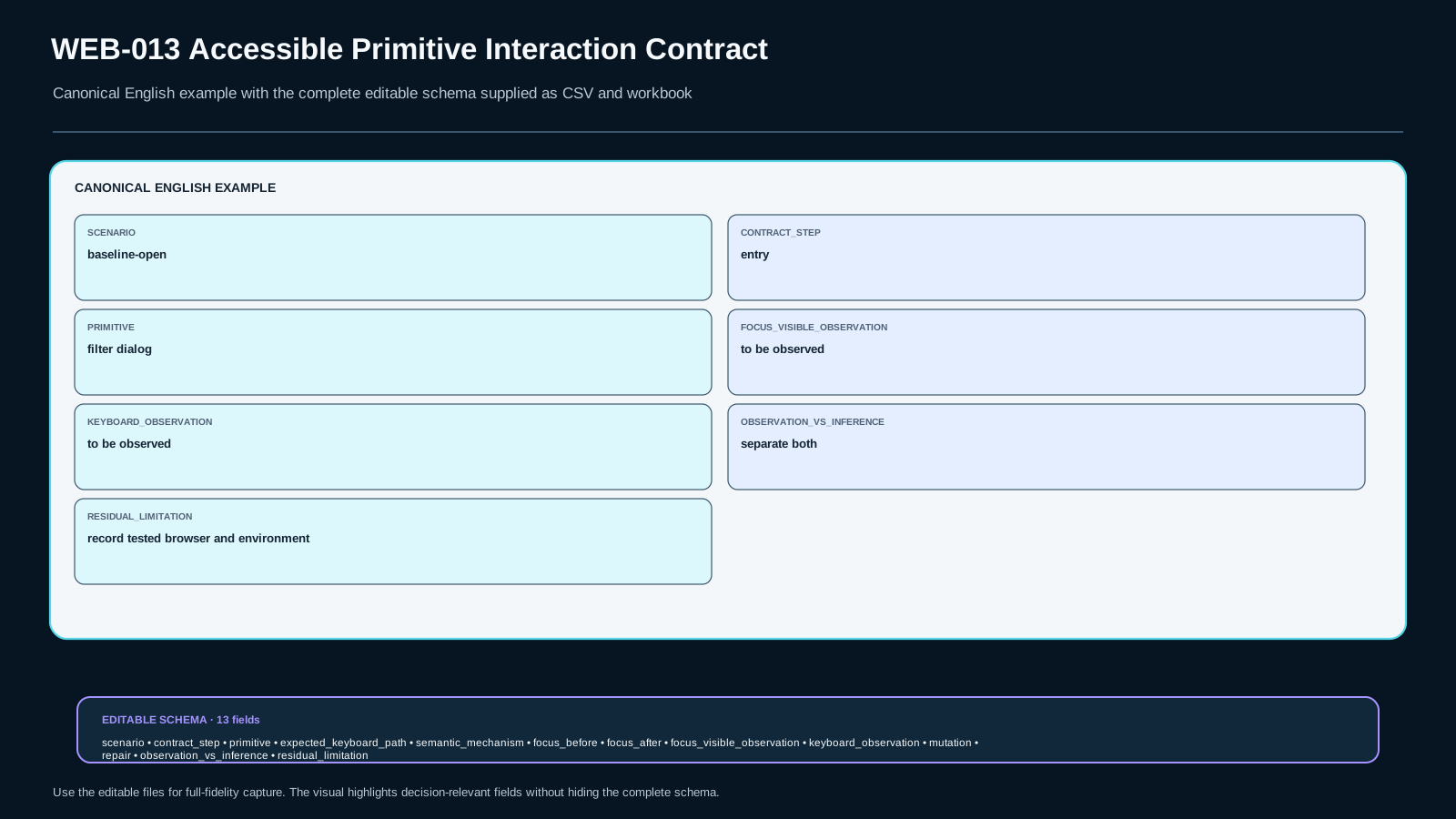
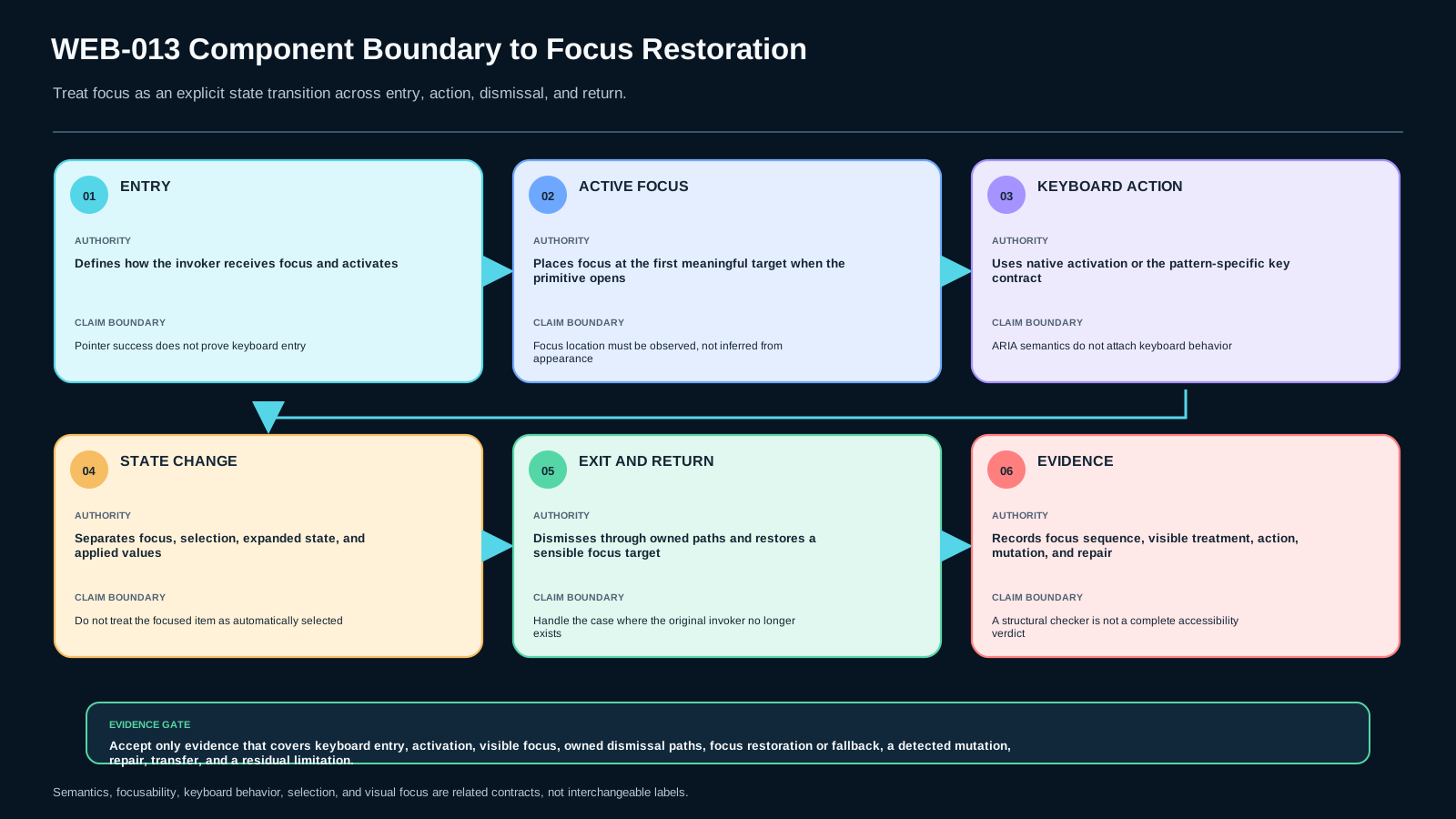
The artifact you will build is Accessible Primitive Interaction Contract v1. For every important interaction, it records:
- Entry: what control starts the interaction and how a keyboard user reaches it.
- Active focus: where focus is before and after the action, and whether that location is visibly discernible.
- Keyboard action: which key performs the operation in this specific pattern.
- State change: what actually changes in the UI or DOM.
- Exit and restoration: how the user leaves the primitive and where focus goes afterward.
- Evidence: what was observed, which mutation was run, what repair was made, and what limitation remains.
Four dimensions are critical. First, all functionality in our bounded primitive must remain operable without pointer-only actions. Second, keyboard focus must remain visible. Third, focus entry, movement, dismissal, and restoration must be deliberate and predictable. Fourth, if a custom composite widget is used, its semantics, state model, and keyboard behavior must form one coherent pattern contract; isolated ARIA attributes are not enough.
The non-goals matter just as much. Adding ARIA does not automatically create keyboard behavior. Focus and selection are not the same state. Positive tabindex is not a general-purpose ordering tool. And there is no single keyboard pattern that can be copied unchanged into every widget.
The bounded lab uses a filter panel in a local HTML/CSS/JavaScript fixture. You will prefer native elements where they fit, implement only the custom behavior that the design genuinely requires, predict at least one failure before running it, observe the failure, repair it, and then repeat the reasoning in a changed context. A passing screenshot is not the completion criterion; traceable interaction evidence is.
Three routes, one contract
Different learners need different amounts of scaffolding. The evidence bar does not change.
Foundation route. Start with native controls and the browser's normal focus behavior. Learn to identify the tab sequence, document.activeElement, visible focus, and the difference between an element being selected and being focused. Use the interaction matrix row by row before adding custom behavior.
Repair route. Start from the failure you actually have: a click-only control, invisible focus, focus trapped in the wrong place, or focus lost after closing/removing UI. Reduce the problem to one contract row, observe it, repair it, then restore the complete scenario. Do not rewrite the entire component merely to hide the symptom.
Experienced route. Skip elementary syntax. Begin by declaring the interaction pattern, focus ownership, expected keyboard path, and exit/restoration rule. Then implement the smallest mechanism that satisfies the contract and prove it with mutation and transfer evidence. Framework familiarity does not waive the evidence requirement.
Two prerequisite boundaries are active. WEB-009 is a hard prerequisite: the feature must already use defensible semantic structure. This lesson does not repair a document made of meaningless containers. WEB-010 is a soft prerequisite: its responsive-layout evidence can be reused when the panel changes size or position, but this lesson does not re-teach Grid, Flexbox, or responsive constraints.
One adjacent boundary is particularly important. WEB-019 owns direction and bidi behavior, including directional-key context. Here we may record that a changed direction or locale can affect a product requirement, but we do not invent a universal Left/Right Arrow rule. Keyboard behavior is pattern-specific and direction-sensitive decisions belong to the relevant pattern and later direction/bidi scope.
A useful working rule is:
Prefer native behavior, then make every custom behavior explicit.
Native HTML controls usually arrive with browser semantics and keyboard behavior that a custom div does not. That does not mean native elements solve every product interaction. It means custom behavior has an engineering cost: you now own semantics, input behavior, state synchronization, focus behavior, and regression evidence.
Throughout the lesson, separate three questions:
- What is the user trying to do?
- What pattern and element semantics represent that operation?
- What observable evidence would show that the keyboard/focus contract is preserved?
If those answers cannot be stated before implementation, the component is not ready for confident customization.
Mental model: component boundary → focus path → action → state → restoration → evidence
A keyboard interface is easier to reason about when you model focus as an explicit state transition rather than a cosmetic border.
1. Start with the component boundary
The page contains many things that can receive focus. Your bounded primitive owns only a subset of them. For our filter panel, the boundary begins at the Filters trigger, includes the controls inside the opened panel, and ends when the panel is dismissed and focus is restored to a sensible target.
The boundary should answer: what enters the primitive, what operates inside it, what exits it, and what happens if the element that originally invoked it no longer exists?
2. Distinguish the tab sequence from movement inside a component
Tab and Shift+Tab normally move between focusable components in the page's sequential focus navigation. Many native controls already participate correctly without custom JavaScript.
Composite widgets are different. A widget such as a tablist, menu, listbox, tree, or grid can contain several interactive descendants while exposing a smaller number of tab stops. Pattern-specific keys—often arrow keys—may move the active focus inside the widget. That internal navigation is not a reason to assign positive tabindex values across the page. It is a reason to implement the chosen widget pattern deliberately.
The key point is that keyboard conventions belong to a pattern, not to ARIA in the abstract. If you set role="menu", the browser does not write the menu keyboard interaction for you. You have declared semantics and thereby accepted responsibility for the matching behavior.
3. Focus is not selection
Focus is the current keyboard interaction location. In the DOM, document.activeElement is a useful observation point. Selection is a separate state. A tab can remain selected while focus moves elsewhere; a listbox can contain selected options that do not currently have focus.
Conflating the two creates bugs. For example, a developer may style aria-selected="true" so strongly that it is mistaken for the focus indicator, while the actual focused element has no visible treatment. Or they may change selection every time focus moves even though the product pattern calls for explicit activation.
Your evidence matrix records focus and state separately so that a visual state cannot masquerade as keyboard location.
4. Focus movement should have a reason
Programmatic focus is neither always good nor always bad. It is useful when a state transition would otherwise leave the user's interaction context unclear. Opening a modal dialog, completing a destructive operation, removing the focused item, or dismissing a temporary surface may all require deliberate focus movement.
The question is causal: what changed, and what target best preserves continuity?
When our panel opens, moving focus into it can make the active context clear. When it closes, returning focus to the invoker is normally sensible if the invoker still exists and remains usable. If the invoker was removed by the operation, the contract needs a documented fallback—perhaps the next logical control, a stable heading region that can be focused intentionally, or another product-specific target. “Let the browser put focus somewhere” is not a restoration policy.
5. Visible focus is part of the observable interface
Keyboard operation is not sufficient if the user cannot tell where keyboard focus is. The default browser focus indicator is often the safest baseline. If design overrides it, the replacement must remain discernible across the intended visual states and environments.
A common failure is global CSS such as outline: none with no equivalent focus-visible treatment. Another is a focus style that disappears against one background, or is visually indistinguishable from selection.
The contract therefore records both focus target and focus visibility. The DOM can say focus moved correctly while the user still experiences a failure.
6. Evidence closes the loop
For each contract row, collect a chain:
entry → active focus → keyboard action → state change → exit/restore → observation
Then deliberately break one dimension. Predict the failure before running the mutation. Observe it. Repair only the owned cause. Re-run the baseline and a changed-context case. Finally, state one limitation—for example, that the exercise was verified in a particular browser and is not a complete accessibility conformance audit across every assistive technology.
That chain prevents two weak conclusions: “the code looks right” and “the screen looks right.” The lesson accepts neither without behavior evidence.
Foundation: native controls, focusability, and the smallest necessary JavaScript
The fastest route to reliable keyboard behavior is often to avoid recreating behavior the platform already provides.
Use an actual button for an action
If something activates an operation, begin with <button>. A native button is focusable in normal navigation and has built-in keyboard activation behavior. A clickable <div> does not become a complete button merely because it has a click handler. Adding role="button" announces semantics to accessibility APIs, but it still does not provide all native button behavior automatically.
For a panel trigger:
<button id="open-filters" type="button" aria-haspopup="dialog">
  Filters
</button>
The ARIA attribute supplements the interaction model; the button element still supplies the core button semantics and activation behavior.
Preserve the natural tab order
Use source order and native focusability before reaching for tabindex. tabindex="0" can place an otherwise focusable custom element in the sequential order, while tabindex="-1" is useful for an element that should be programmatically focusable but not a normal tab stop. Positive values such as tabindex="7" create a parallel ordering system that is difficult to maintain and can diverge from reading/source order.
For ordinary forms, links, and buttons, you generally should not need a positive tabindex at all.
Use :focus-visible carefully
A design can customize focus without hiding it. One reasonable pattern is to keep a clear default and use :focus-visible for a keyboard-oriented enhancement:
:where(button, input, select, [tabindex]):focus-visible {
  outline: 3px solid currentColor;
  outline-offset: 3px;
}
This example is not a universal visual specification. Your actual color, thickness, contrast, and component geometry must satisfy the product's accessibility requirements. The important engineering rule is that overriding the browser focus indicator transfers responsibility to your design and QA.
Observe focus directly
During debugging, inspect document.activeElement after important transitions. A tiny helper can make the current target visible in a developer log:
function reportFocus(label) {
  console.log(label, document.activeElement);
}
Do not turn the log into proof by itself. It is one observation surface. Pair it with actual keyboard operation and visible focus inspection.
Use the interaction lifecycle instead of scattered event handlers
For a dialog-like filter panel, define four functions conceptually:
openPanel(invoker)records the invoker, opens the panel, and establishes an appropriate initial focus target;operate()handles the panel's native controls and any intentionally custom interaction;closePanel(reason)closes the panel and determines restoration;restoreFocus()returns focus to the invoker or a documented fallback.
This is more testable than unrelated click handlers whose focus behavior emerges accidentally.
Avoid overclaiming from native elements
Using native HTML is a strong default, not a blanket guarantee of product accessibility. A native control can still have a poor label, low-contrast styling, confusing instructions, broken surrounding structure, or incorrect application logic. This lesson's scope is narrower: choose native behavior where possible, then verify the bounded keyboard and focus contract you actually depend on.
Deep explanation: where custom primitives usually fail
Custom interaction bugs often appear at boundaries between semantics, input handling, and state transitions.
ARIA declares semantics; your code owns behavior
ARIA roles, states, and properties help expose semantics to assistive technologies. They do not generally synthesize the keyboard interaction of a custom widget. If you make a div into a button-like object with role="button", you still own focusability, activation keys, disabled-state behavior, focus styling, and state synchronization.
This is why “we added ARIA” is not an acceptance result. The evidence question is: can a keyboard user reach and operate the function, and do the exposed state and behavior agree?
Opening is only half of a temporary surface
A temporary surface—dialog, popover-like panel, menu, disclosure region—creates a context change. The user needs to understand where interaction moved. In some patterns, focus remains on the trigger while content is revealed; in others, focus moves into the opened surface. There is no universal rule independent of pattern.
For our dialog-like panel, the contract chooses a deliberate initial target. That target should be meaningful, not simply “the first element in the DOM” by accident. If the panel contains an explanatory heading followed by a search field, the product may choose the first field. If immediately focusing a destructive button would be risky, choose a safer target.
Dismissal requires a destination
Closing can happen for several reasons: Cancel, Apply, Escape, route change, or state update. Each close path should converge on the same restoration policy unless the product has a justified exception.
A robust policy records the invoker at open time. At close time:
- if the invoker still exists, is not disabled, and is a sensible destination, focus it;
- otherwise use a documented fallback based on the new UI state;
- never fabricate restoration by focusing an unrelated element solely because it is easy to query.
The changed-context lab intentionally challenges this rule by allowing the original trigger to be replaced or removed.
Removing the focused node is a special boundary
If an operation removes the element that currently has focus, the browser may fall back to a place that is not useful to the user. Lists, notifications, dialogs, and dynamic filters often hit this case. The component contract should decide whether focus moves to the next item, previous item, collection container, invoker, or another stable destination.
Again, the answer is contextual. What matters is that the transition is designed and tested rather than left undefined.
Composite widgets need one coherent contract
Suppose the design adds a custom segmented control for Grid / List / Compact view. If you implement it as a true radio group, the semantics, selected state, tab behavior, arrow-key behavior, and visual focus/selection distinction must agree. If you instead use three ordinary buttons because they trigger independent commands, forcing radio semantics onto them would be incorrect.
The decision starts with the interaction model, not with whichever ARIA role looks closest to the visual design.
When a composite uses roving tabindex, typically one child participates in the tab sequence while arrow-key navigation moves focus among children by changing tabindex values and calling focus(). Some patterns instead keep DOM focus on a container and expose an active descendant. Those are pattern-level choices with different implementation and scrolling implications. This lesson requires you to recognize that choice, not to memorize a single technique for every composite.
Keyboard support should not conflict with platform behavior
Avoid inventing shortcuts when ordinary navigation already provides access. A keyboard shortcut can improve efficiency, but it should not become the only path to a feature. It can also conflict with browser, operating-system, or assistive-technology commands.
Our bounded primitive therefore relies on standard navigation and pattern-specific actions. It does not add global shortcuts merely to demonstrate keyboard code.
Visual evidence and structural evidence complement each other
A focus ring is visual evidence. document.activeElement is DOM evidence. A state attribute such as aria-expanded or a dialog's open state is semantic/state evidence. A keyboard action sequence is interaction evidence. None alone proves the whole contract. The matrix combines them so that a passing dimension cannot conceal a failing one.
Worked example: a filter dialog from requirement to evidence
We will build a small filter panel with a native trigger, a dialog-like surface, ordinary form controls, Apply/Cancel actions, and explicit focus restoration.
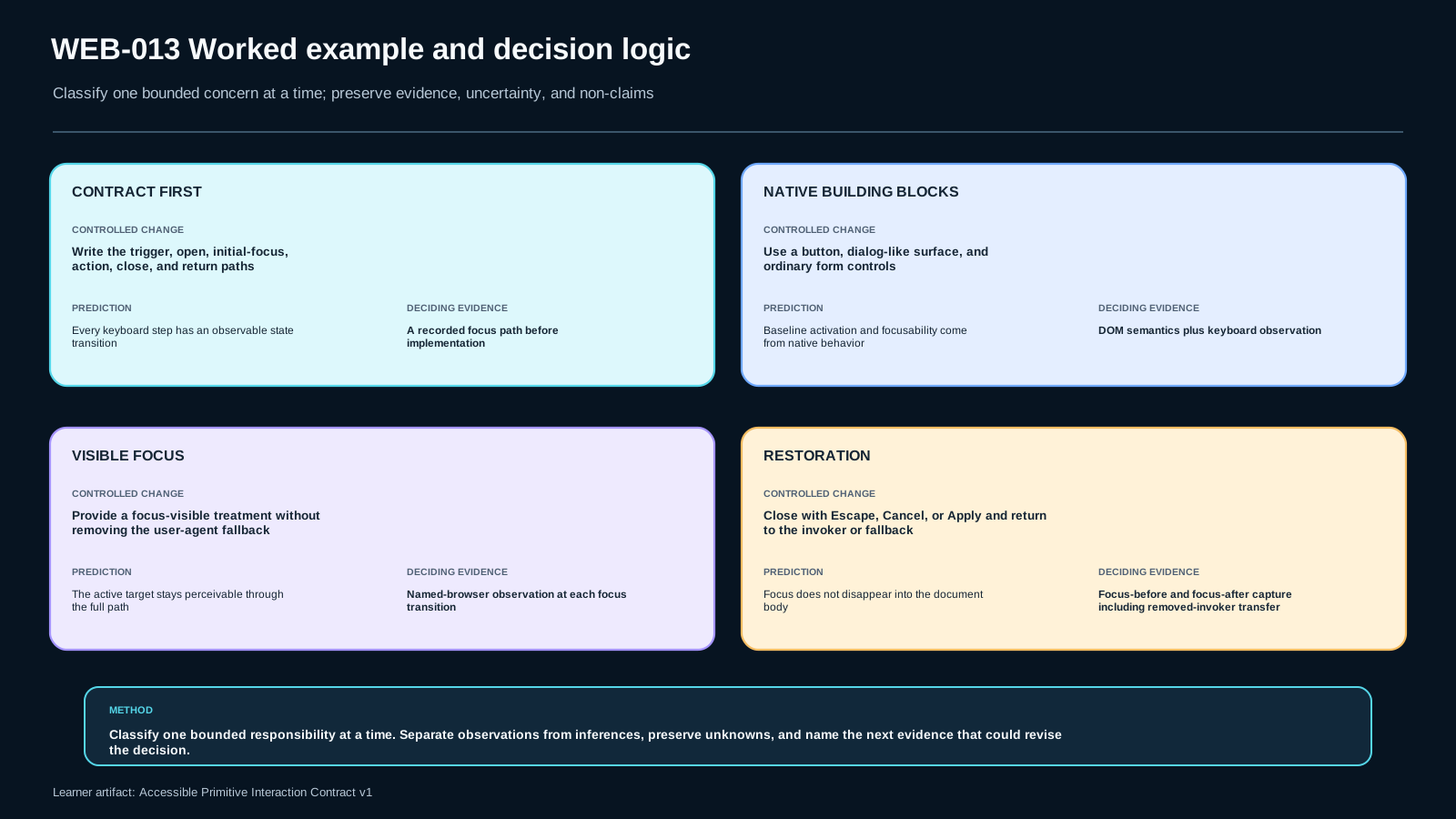
Step 1: write the contract before the code
Baseline contract:
| Phase | Contract |
|---|---|
| Entry | Tab can reach the Filters button; activation works from the keyboard. |
| Open | The panel opens and focus moves to the agreed first meaningful control. |
| Operate | Every filter option can be reached and changed without a pointer. |
| Visible focus | The active element has a discernible focus indicator. |
| Dismiss | Cancel and the pattern-supported Escape path close the panel. |
| Restore | Focus returns to the invoker if it remains valid; otherwise to the documented fallback. |
| Evidence | Observed active element/state, mutation result, repair result, and limitation are recorded. |
This table is a decision record, not an implementation prescription. If the product chooses a disclosure rather than a dialog, the open/focus/dismiss rules may differ.
Step 2: choose native building blocks
Use a native <button> for the trigger and ordinary <input> controls for filters. The local lab uses a <dialog> element as a bounded container so the exercise can focus on interaction reasoning rather than a framework-specific modal system.
The panel contains:
- a heading with a stable accessible name relationship;
- a search field;
- native checkboxes;
- Apply and Cancel buttons;
- one intentionally questionable custom action in the starter so that the learner must decide whether to replace it with a native button or implement the complete custom contract.
Step 3: define open and close paths
Pseudo-code:
let invoker = null;

function openFilters(source) {
  invoker = source;
  dialog.showModal();
  firstMeaningfulControl.focus();
}

function closeFilters(reason) {
  dialog.close(reason);
  restoreAfterClose();
}
The important part is not the function names. The important part is that every close path reaches the same restoration policy.
Step 4: define restoration with a fallback
function restoreAfterClose() {
  if (invoker?.isConnected && !invoker.disabled) {
    invoker.focus();
    return;
  }
  fallbackTarget.focus();
}
The fallback target must be chosen from product context and justified from the state that remains after the transition. The independent transfer fixture intentionally does not preselect that target; the learner must choose, implement, and verify it.
Step 5: run the baseline evidence row
Use only the keyboard. Reach Filters, open it, operate each control, inspect the visible focus indicator, dismiss the panel, and record document.activeElement after open and after close. Confirm that the state exposed to users matches the visible state.
Do not write “works” in the evidence matrix. Write observations such as:
- “After keyboard activation,
document.activeElementis the keyword input.” - “A 3px outline is visible around the active Cancel button on the panel background.”
- “After Cancel, focus returns to
#open-filters.”
These statements can be falsified and rechecked.
Step 6: run a deliberate failure mutation
Mutation A removes the explicit focus-visible treatment from the repaired implementation. Predict the result: keyboard operations may still execute while the active location becomes hard or impossible to discern in the chosen styling.
Mutation B removes the restoration call. Predict the result: after dismissal, the browser may place focus somewhere that does not preserve the user's previous context.
Mutation C changes one custom action into click-only behavior. Predict the result: a pointer can activate it but the same functionality is not available through the expected keyboard path.
Run one mutation at a time. If multiple defects are introduced together, you lose diagnostic clarity.
Step 7: changed-context transfer
Now change the scenario: applying filters causes the original trigger to be replaced by a compact toolbar. The old invoker is no longer connected. Your previous restoration rule must not throw or attempt to focus a detached node. Choose a new stable fallback and justify it.
This is the transfer test. Copying the baseline code without reconsidering the transition is not enough.
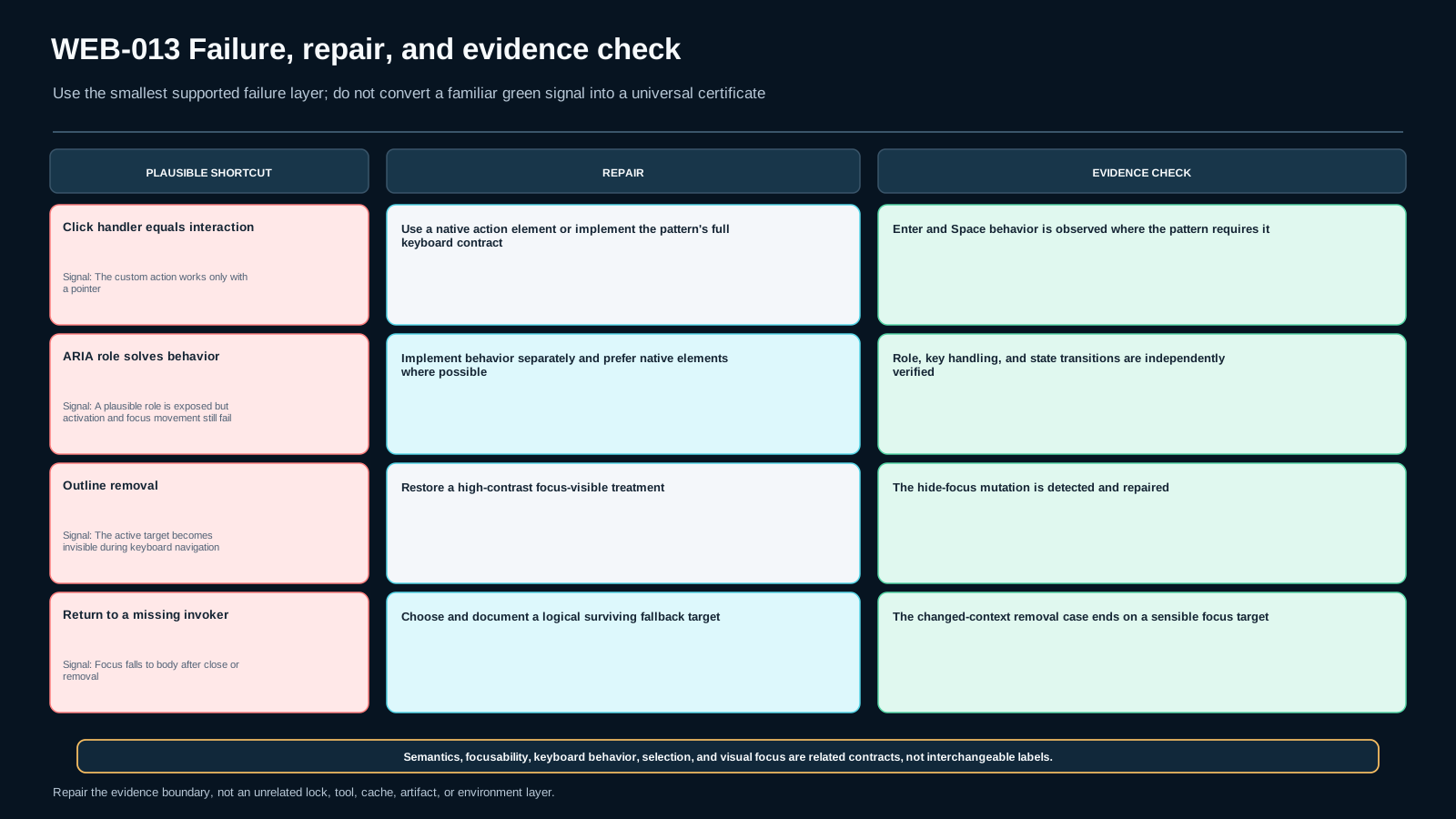
Failure modes: plausible shortcuts that break the contract
“It has a click handler, so it is interactive”
Pointer activation proves only pointer activation. If a custom element represents an action, verify focusability and the pattern's activation keys—or replace it with the native element that already provides the behavior.
“We added role, so the keyboard problem is solved”
A role changes exposed semantics; it does not automatically attach the matching keyboard event model. The failure is especially dangerous because accessibility tooling may now see a plausible role while the behavior still fails.
“We removed outlines because focus is ugly”
Removing the browser indicator without an equivalent replacement can make the interface unusable for keyboard users. Design the indicator; do not erase the state.
“Selection styling is close enough to focus styling”
Focus and selection can exist on different elements. If their visuals are indistinguishable, users may not know where the next keyboard command will act.
“Set positive tabindex until the order looks right”
This creates a second ordering system that can diverge from DOM/source order and becomes fragile as components are inserted or removed. Repair the source/component structure or use a pattern-specific internal focus-management technique instead of numbering the whole page.
“Always focus the first control when anything opens”
The correct initial target depends on the pattern and task. A disclosure can reasonably keep focus on its button. A modal dialog often needs focus moved inside. A menu has its own expected navigation. Pattern first, then focus rule.
“Escape always closes everything”
Escape is common in many temporary-surface patterns, but keyboard behavior is pattern-specific. Do not create a universal app-wide Escape handler that closes unrelated UI or overrides expected nested behavior.
“Passing an automated checker proves accessibility”
Automated checks can find important defects, but this lesson requires interaction evidence: actual keyboard paths, focus visibility, state behavior, mutation/repair, and transfer. A local passing script is a guardrail, not a claim of full conformance.
Experienced bridge: treat focus as an API contract
For experienced engineers, the useful abstraction is an interaction state machine.
Define states such as closed, opening, open, and closing; define the focus owner in each state; define allowed input events; define the transition that changes DOM/state; define the postcondition for document.activeElement; and define the fallback if an expected node disappears.
This model scales better than ad hoc focus calls because it makes race conditions visible. In component frameworks, asynchronous rendering can make focus() run before the target exists, or a re-render can replace the node you stored as the invoker. The correct framework-specific timing mechanism belongs to implementation detail, but the contract stays stable: after the transition completes, focus must satisfy the declared postcondition.
Experienced engineers should also inspect event ownership. If both a nested widget and its parent react to the same key, a broad handler can produce double actions. Pattern-specific handlers should be scoped to the component that owns the command. Avoid preventing default behavior unless the component intentionally replaces that behavior and supplies the complete alternative.
For composite widgets, decide explicitly between native controls, roving tabindex, or an active-descendant model. Do not choose based on code compactness alone. Consider the pattern semantics, focus visibility, scrolling behavior, assistive-technology expectations, virtualization constraints, and how easily the chosen model can be tested.
The advanced acceptance question is not “Can I make the keydown handler work?” It is “Can another engineer read the contract, predict focus after every state transition, and verify that semantics, state, keyboard behavior, and visuals remain synchronized?”
Alternatives and tradeoffs: choose the smallest mechanism that preserves the contract
Native disclosure vs dialog-like surface
If the content simply expands in place and does not create a modal context, a native disclosure pattern may be enough. Keeping focus on the trigger can be appropriate. If the interaction creates a temporary modal task that blocks the rest of the page, a dialog-like pattern has different focus and dismissal obligations.
Do not choose “dialog” because it looks like a floating card. Choose it because the interaction model is dialog-like.
Native controls vs custom composites
Native buttons, checkboxes, radios, and selects minimize the behavior you have to recreate. A custom composite can support richer interaction or design constraints, but it also increases the surface you must specify and test.
If the product merely needs three independent commands, three buttons may be clearer than a fabricated tablist. If the product truly represents one selected option from a set, a radio group or another appropriate selection pattern may fit better.
Roving tabindex vs active descendant
Both can support internal navigation in appropriate composites. Roving tabindex physically moves DOM focus among items and can naturally bring the focused element into view. An active-descendant approach can keep DOM focus on a container while exposing the active item through an ARIA relationship. The right choice depends on the pattern and implementation constraints.
This lesson does not declare one universally superior. The evidence artifact should record the chosen mechanism and the observable behavior it must preserve.
Custom focus styling vs browser default
Custom focus styling can align with a design system and improve visibility. It also creates responsibility for contrast, shape, offsets, forced-colors/high-contrast behavior, and component states. Keeping the browser default is often a better baseline than removing it before a robust replacement exists.
Automatic focus movement vs user-controlled navigation
Programmatic focus can preserve context after a meaningful state transition. Excessive focus movement can also surprise the user and steal control. The criterion is not “always move focus” or “never move focus”; it is whether the chosen movement is part of the pattern's clear, predictable interaction contract.
Practice: fade support without lowering the evidence bar
Guided practice: one contract row
Take the open transition only. Before touching code, write:
- entry control;
- activation method;
- expected new state;
- expected
document.activeElement; - expected visible focus indicator;
- one observation that would prove the transition failed.
Implement or repair only that transition. Then run it with a keyboard and record the result.
Repair practice: one failing dimension
Choose one of these starter failures:
- the custom action responds only to pointer click;
- the focus indicator is suppressed;
- the panel closes without a deliberate restoration policy.
Predict the symptom, reproduce it, repair only the owned cause, then rerun the complete baseline so the narrow repair does not regress another dimension.
Independent practice: changed context
Modify the transfer fixture so that applying a filter replaces the original trigger or removes the currently focused item. Without copying a supplied answer, define:
- the new restoration destination;
- why it is the most coherent next point of interaction;
- how you will observe the result;
- one limitation of the test environment.
The final transfer must not rely on AI to choose the decisive implementation or conclusion. AI can suggest checks after you state the contract, but it cannot invent observed browser behavior or make the final judgment for you.
Completion discipline
Do not expand the task into a complete design-system accessibility audit. This lesson owns one bounded primitive. Record adjacent issues separately. A good engineer can say both “this contract is satisfied” and “this does not prove every accessibility requirement on the page.”
Verification: what counts as evidence
The Accessible Primitive Interaction Contract v1 is accepted only when its rows contain inspectable observations rather than confidence statements.
Record the environment: browser/version, operating system, input method used for the test, and whether an assistive technology was included. If no assistive technology was tested, say so. Do not silently generalize keyboard-only evidence into screen-reader evidence.
For each row, record:
- scenario and component state;
- entry control and keyboard action;
- active element before and after;
- state/attribute change that was observed;
- whether focus was visibly discernible;
- whether the operation was available without a pointer;
- exit path and restoration target;
- observation separated from inference/decision;
- mutation and predicted failure;
- actual mutation result;
- repair and repair result;
- changed-context result;
- residual limitation.
A strong observation is specific: “After pressing Escape while the filter dialog is active, the dialog closes and document.activeElement.id is open-filters.” A weak observation is “keyboard works.”
A strong limitation is bounded: “Verified with keyboard in the recorded browser; this is not evidence of behavior across every browser/assistive-technology combination.” A weak limitation is “might have bugs.”
The public run_checks.py in the lab checks structure and guards against obvious omissions. It is intentionally unable to certify the actual browser interaction. That distinction is important: a script can confirm that the evidence file has the required shape, but it cannot fabricate the learner's observed focus path.
Before completion, run three passes:
- Baseline: all owned contract rows pass.
- Mutation/repair: at least one deliberate failure is detected and the repaired version restores the contract.
- Transfer: a changed context is solved independently, including restoration when the original focus target changes or disappears.
If one critical dimension fails, the bounded feature is not accepted yet.
Assessment and transfer
The summative set covers five cognitive actions rather than five versions of the same recall question.
Retrieval: state the bounded interaction contract and one explicit non-goal. This checks whether you can distinguish the lesson's ownership from adjacent accessibility topics.
Application: implement the filter primitive and submit evidence for keyboard operability, visible focus, focus movement/restoration, and the pattern contract.
Diagnosis: inspect a deliberate mutation—such as suppressed focus visibility or missing restoration—and identify the failed contract dimension from observable behavior.
Decision: defend a mechanism choice, such as native button versus custom role-based control, or disclosure versus dialog-like interaction, against a plausible alternative. The answer must state the requirement that makes the choice appropriate rather than declaring a universal winner.
Transfer: solve the changed-context case where the original invoker is replaced or the focused item is removed. Define and justify the new restoration target and record evidence independently.
Application, diagnosis, and transfer are blocking because they demonstrate behavior rather than vocabulary alone. Retrieval and decision still matter, but a fluent explanation cannot compensate for a keyboard-inoperable implementation.
References, freshness, and claim boundaries
This lesson uses exactly three external authority sources, all from W3C, and keeps their roles narrow.
- S-WCAG22 — WCAG 2.2: normative accessibility criteria relevant to keyboard operability and visible focus. It supports the bounded requirements; it is not treated as a complete implementation recipe.
- S-APG-KEYBOARD — ARIA Authoring Practices, Developing a Keyboard Interface: guidance on keyboard conventions, focus visibility/predictability, tab sequence, composite focus management, and focus-versus-selection. It is guidance, not a substitute for the normative standard.
- S-APG-PRACTICES — ARIA Authoring Practices, Practices: broader official practices for accessible semantics and widget interaction contracts.
The source set was rechecked against the current official W3C pages on 2026-09-10. No source expansion was needed and the Bible's claim boundaries remain usable. The scheduled review due date remains 2026-12-31.
Two uncertainty boundaries remain explicit. Browser and assistive-technology behavior can vary, so one local observation is recorded as an observation from that environment, not universalized. Product requirements can also change the appropriate pattern and restoration target, so the lesson teaches a contract-and-evidence method rather than one permanent widget implementation.
The final non-claims remain active: ARIA does not automatically provide keyboard behavior; focus is not selection; positive tabindex is not a general ordering solution; and no single keyboard pattern applies unchanged to every widget.
Assessment
There is no answer key in this lesson pack; answer it yourself and mark honestly. "Needs review" sends the lesson to your review queue.
WEB-013-S1 retrieval
State the minimum keyboard/focus contract for a bounded interactive primitive. Distinguish semantics from behavior, explain why focus must remain discernible, and include one explicit non-claim about ARIA, focus versus selection, positive tabindex, or universal keyboard patterns.
WEB-013-S2 application
Repair WEB013-LAB1 so the filter primitive can be entered, operated and dismissed with the keyboard; focus is visibly discernible; and closing the primitive restores focus to a sensible target. Complete Accessible Primitive Interaction Contract v1 with direct observations for entry, operation, state change and exit/restore.
WEB-013-S3 diagnosis
Run one deliberate failure mutation: hide visible focus, drop sensible focus restoration, or turn an action into a pointer-only custom control. Predict the observable failure first, run the mutation, diagnose which contract dimension failed, and repair only that boundary.
WEB-013-S4 decision
Defend a native-first mechanism for the bounded primitive against a plausible custom role-based alternative. State what native behavior you are reusing, what product requirement might justify custom behavior, and what evidence would make you change your decision.
WEB-013-S5 transfer
Independently solve the changed-context transfer fixture: a row action opens a confirmation primitive, and the invoking row may be removed after confirmation. Preserve keyboard operability and visible focus, then choose and justify a sensible fallback focus target when the original invoker no longer exists. Record one mutation and one residual limitation.
Assessment rubric
Critical dimensions
- Contract correctness — semantics, keyboard behavior, focus visibility and focus movement agree with the bounded primitive.
- Evidence quality — observations are distinguished from inference; mutation and repair are traceable.
- Scope discipline — WEB-009 base semantics, WEB-010 responsive layout and WEB-019 direction/bidi concerns are not silently re-owned.
- Transfer independence — the changed-context case is solved without a decisive answer key.
Blocking rule
S2, S3 and S5 are blocking. A blocking response fails when a required pointer-only path remains, focus is not discernible, focus movement/restoration is unjustified, mutation evidence is missing, or the changed-context decision is copied without accounting for the changed condition.
Evidence rule
A screenshot or a passing static checker alone is not proof. The learner must record direct browser/DOM observations, the tested environment, the mutation outcome, the repair outcome and one residual limitation. AI-generated claims are not accepted as observed evidence.
References & freshness
Case studies
Lab files
Goal
Repair a bounded filter primitive so its keyboard and focus contract is observable and defensible. The starter is intentionally broken; do not treat public structural checks as an accessibility verdict.
Required path
- Record the expected contract before editing.
- Use the keyboard to enter, operate and dismiss the primitive.
- Make focus visibly discernible.
- Remove the pointer-only requirement from the custom action, preferably by choosing a native control when that preserves the product contract.
- Implement or justify sensible focus restoration after dismissal.
- Run one deliberate mutation with
mutation_probe.py, predict the failure before running it, observe it, repair it and record the result. - Complete the changed-context transfer where the invoker may be removed.
- Fill
evidence/learner_evidence.jsonwith direct observations and one residual limitation.
Boundary
Do not redesign responsive layout or directional-key behavior. Those concerns belong to adjacent lessons unless they directly prevent this bounded keyboard/focus contract.
Public checker modes
Run python run_checks.py --structure-only before repair to validate the supplied starter package. After completing the repair and evidence rows, run python run_checks.py without that flag. A PASS is structural/evidence completeness only; direct browser behavior must still be observed and recorded by you.
Lesson media & slides
Teaching files (download)