وب مدرن، رابط کاربری و تجربهی وب · فصل ۲ — HTML، CSS، Responsive و RTL · 38
Responsive CSS: Grid, Flex, and Logical Properties
Design a bounded responsive layout by choosing Grid/Flex for the actual layout problem, using writing-mode-relative logical properties where appropriate, and proving behavior across widths and directions without corrupting logical source order. میتواند «Responsive CSS: Grid, Flex و Logical Properties» را در یک feature محدود طراحی/پیادهسازی کند و correctness، accessibility یا failure behavior مرتبط را اثبات کند.
Lesson summary
Design a bounded responsive layout by choosing Grid/Flex for the actual layout problem, using writing-mode-relative logical properties where appropriate, and proving behavior across widths and directions without corrupting logical source order.
میتواند «Responsive CSS: Grid, Flex و Logical Properties» را در یک feature محدود طراحی/پیادهسازی کند و correctness، accessibility یا failure behavior مرتبط را اثبات کند.
This lesson produces
میتواند «Responsive CSS: Grid, Flex و Logical Properties» را در یک feature محدود طراحی/پیادهسازی کند و correctness، accessibility یا failure behavior مرتبط را اثبات کند.
Who it is for
Foundation
Worked baseline, explicit evidence table, safe local fixture and one guided failure probe.
Repair
Reduce to one failing contract, observe evidence, repair, then restore full case.
Experienced
Skip syntax walkthrough; require independent implementation, mutation evidence and residual-risk statement.
Prerequisites
A layout that “works on mobile” can still be structurally wrong
Imagine a product catalog that looks fine on a wide laptop. A filter panel sits on the left, the result list sits on the right, and the header places the brand, search box, and account actions on one line. The developer drags the browser narrower and the page eventually breaks. Their first response is familiar: add a media query at 768px, stack the columns, move the filter above the results with order: -1, and add margin-left to recover spacing. The screenshot now looks acceptable at 375px. The ticket is closed.
Then the product ships in Arabic. The “left” spacing is now on the wrong side. A localized product name contains a long identifier that refuses to shrink and creates horizontal scrolling. Keyboard navigation follows the original DOM order while the CSS order values present a different visual sequence. Another breakpoint is added for a tablet. Then another for a small laptop. Six months later, nobody can explain which breakpoint represents a real constraint and which one is historical patchwork.
This lesson treats that failure as one engineering problem, not four disconnected CSS tricks. Your task is not to memorize Grid, Flexbox, media queries, and logical properties separately. Your task is to establish a responsive layout contract and then prove that the implementation preserves it across changed width, changed content, and changed direction.
The contract for our bounded scenario has four critical dimensions:
- Layout model: choose a mechanism that matches the geometry of the region. Grid is useful when explicit relationships across rows and columns matter. Flexbox is useful when distribution and alignment along a principal axis dominate. Neither is a universal winner.
- Responsive constraint: change layout because a real content or space constraint requires it, not because a device happens to have a marketing name.
- Direction intent: when spacing or placement means “start/end in the writing flow,” encode that intent with logical properties instead of silently assuming physical left/right.
- Order integrity: preserve a meaningful DOM/source sequence. Visual reordering is not a substitute for source order and does not redefine speech or default sequential navigation order.
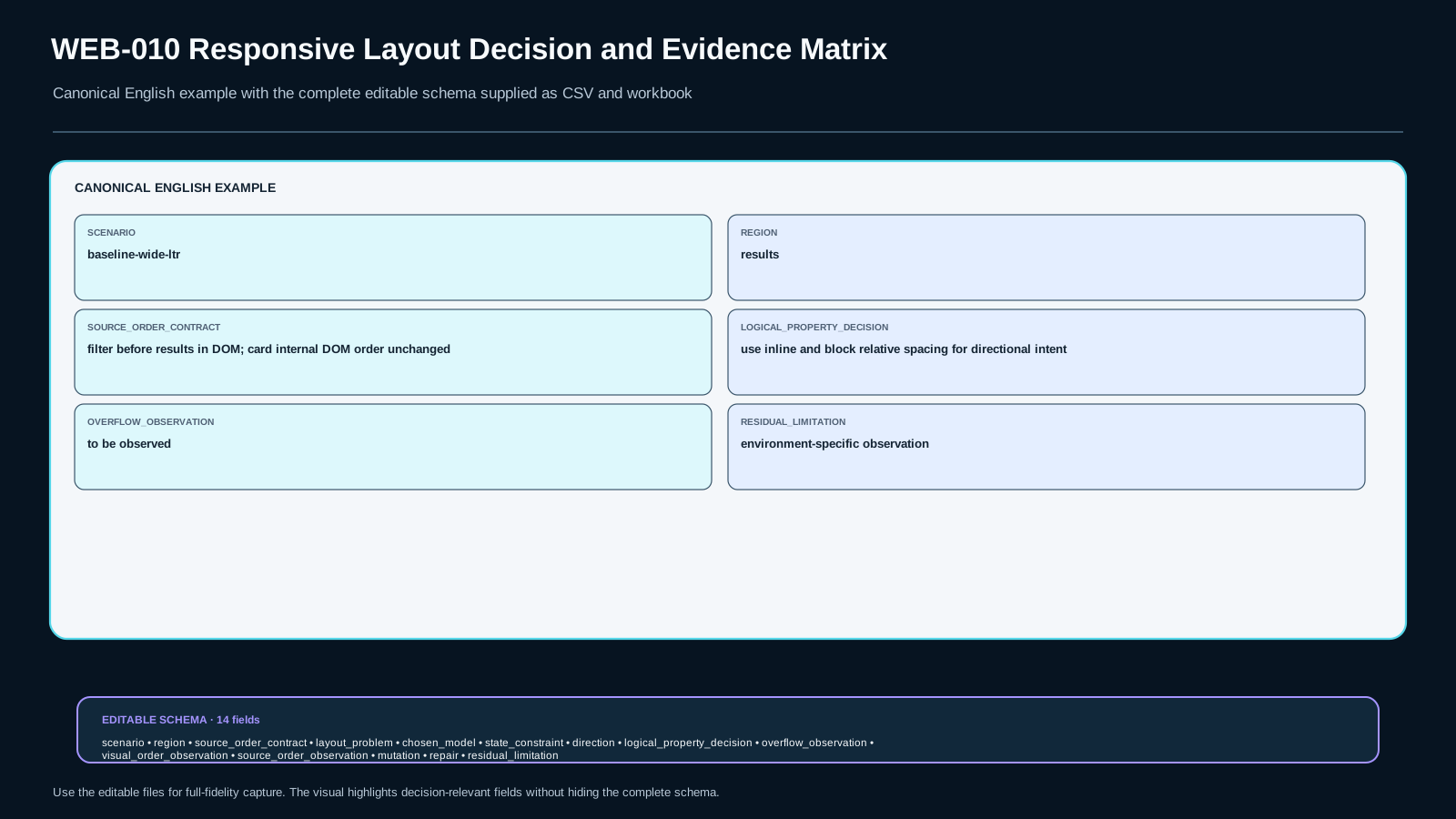
You will produce one artifact throughout the lesson: Responsive Layout Evidence Matrix v1. It is not a screenshot gallery. Each row states the scenario, the layout problem, the chosen mechanism, the constraint that triggers a state change, the direction rule, what was actually observed, what was inferred, what mutation was run, what repair was made, and what uncertainty remains.
The final standard is deliberately stricter than “it looks good at my current width.” A responsive implementation is accepted only when the evidence survives the baseline and a changed context, at least one deliberate failure is detected, and the repair preserves the bounded contract without stealing scope from later accessibility or bidi lessons.
Three routes, one evidence bar
Learners arrive here with very different CSS histories. Some know only basic block flow. Some can write display: flex and display: grid but choose between them by habit. Some have years of frontend experience and can reproduce common responsive patterns from memory. The route may change how much syntax needs explanation; it does not change what must be proven.
Foundation route. Work slowly through axes, tracks, intrinsic sizing, logical directions, and the evidence matrix. Do not start with a full design system. Use one region at a time and predict what the browser should do before changing CSS. The goal is to build a causal model instead of accumulating recipes.
Repair route. If you already write responsive CSS but repeatedly hit one failure—overflow at narrow widths, mysterious min-width, RTL spacing bugs, or visual/DOM order mismatch—reduce the fixture to that failing contract. Observe it, run the targeted mutation, repair the owned cause, then restore the full scenario. Do not rewrite the whole layout merely to escape the failure.
Experienced route. Skip elementary property tours. Start from the contract, classify each region, and justify the smallest layout mechanism that fits. You still must run width/direction mutations, inspect source order, and record residual uncertainty. “I know this pattern” is not evidence.
The prerequisite from WEB-009 is narrow but important: the document must already have a meaningful semantic source structure. This lesson does not reteach semantic HTML. If the DOM sequence is already wrong, CSS cannot turn visual reordering into semantic repair. We therefore assume that the source sequence has a defensible meaning and ask whether the layout layer preserves rather than contradicts it.
The lesson also draws boundaries around adjacent topics. We will observe the default sequential focus order when interactive controls are present because that can expose source-versus-visual order problems. We will not design custom keyboard interaction; that belongs elsewhere. We will switch LTR/RTL direction and use logical CSS properties; we will not claim that logical properties solve Unicode bidi, punctuation, mixed-script ordering, or text shaping. The scope is layout-direction intent, not the entire internationalization stack.
A useful working rule is:
Compress syntax, never compress evidence.
If you can explain gap, minmax(), and margin-inline-start from memory, move faster. If you cannot demonstrate what constraint they address and what observation would falsify your decision, you are not finished.
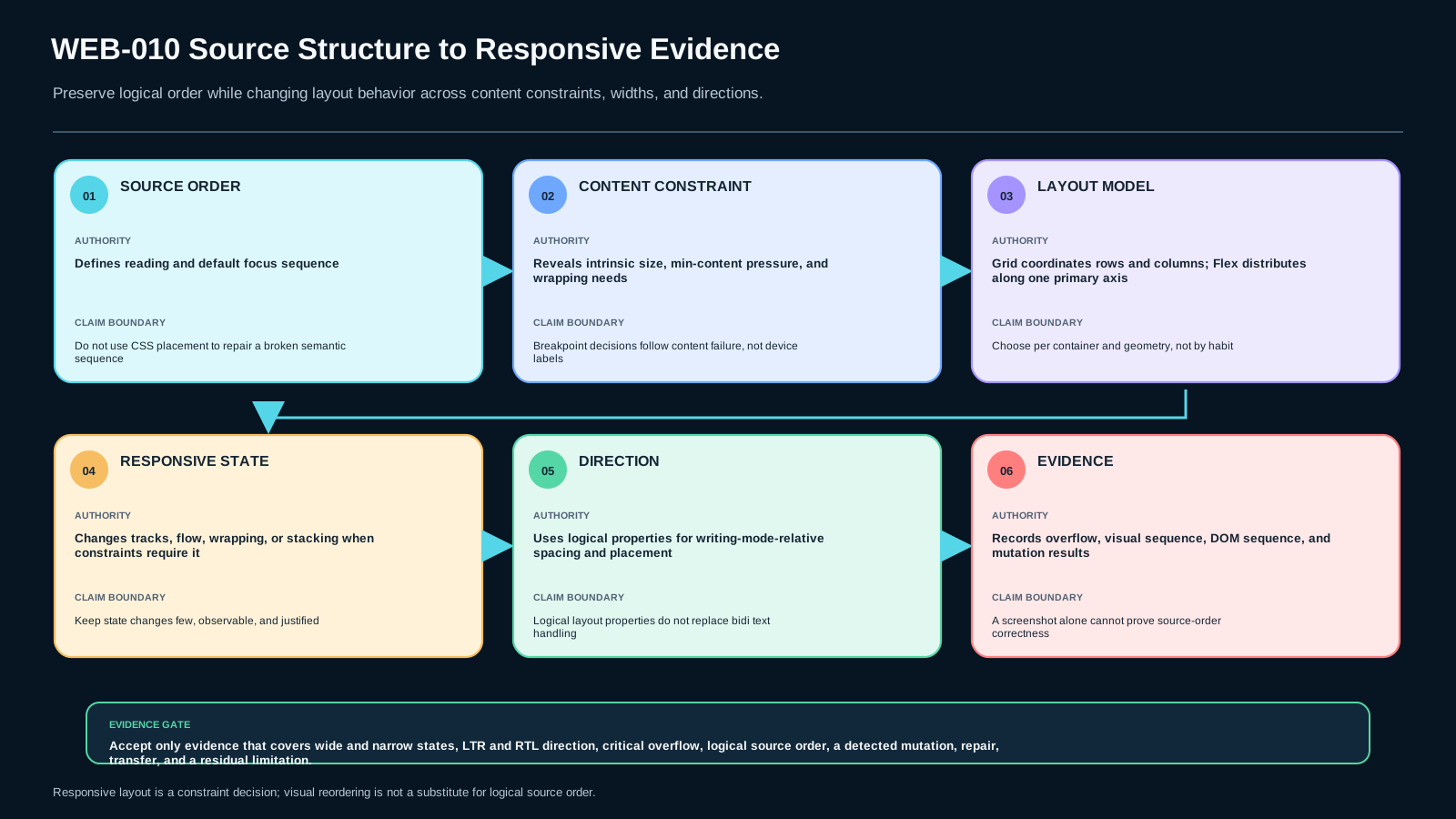
Mental model: source structure → constraint → layout model → responsive state → evidence
Responsive CSS becomes easier to reason about when you stop thinking in terms of named screen categories and start thinking in terms of constraints applied to boxes whose content has intrinsic behavior.
1. Source structure is the invariant you inherit
HTML supplies a sequence of elements. CSS may place those boxes into tracks, distribute them along an axis, wrap them, align them, or visually reorder them. Those capabilities are powerful precisely because presentation can vary without rewriting the document structure. But that separation creates a responsibility: the source order still matters to linear consumption and default sequential navigation.
For our catalog, suppose the meaningful high-level sequence is:
header
main
  filter controls
  results heading/status
  product list
A wide design might place filters beside results. A narrow design might place filters above results. Those two presentations can often share the same DOM order. If you discover that the desired narrow presentation requires order: -999 to put an essential control where it “should have been,” first ask whether the underlying source sequence is wrong or whether the visual requirement itself should change. Do not assume order is a semantic editing tool.
2. Content creates minimum and preferred demands
Boxes are not empty rectangles. Text, images, form controls, intrinsic aspect ratios, long unbreakable tokens, min-content contributions, and explicit minimum sizes all affect how small a region can become. That means a layout can fail even when arithmetic suggests there is enough space.
Consider a two-column grid:
.catalog {
  display: grid;
  grid-template-columns: 18rem 1fr;
  gap: 1.5rem;
}
It is tempting to read 1fr as “the second column can always shrink to whatever remains.” That mental model is incomplete. Track sizing interacts with the intrinsic minimum contributions of the items inside the track. A child containing a long unbreakable identifier or an element with a minimum inline size can prevent the flexible area from becoming as narrow as you expected. The symptom may be horizontal overflow even though you used fractional sizing.
The engineering question is therefore not “Which magic value fixes mobile?” It is “Which box refuses to become smaller, and why?”
3. Layout model describes relationships, not prestige
Grid and Flexbox overlap. Many layouts can be built with either. The distinction we use is not a law that every design must obey; it is a decision aid.
Use Grid when the important contract is expressed as relationships across explicit rows and columns: a filter column aligned with a results column, cards sharing column tracks, regions spanning tracks, or layout areas whose two-dimensional relationship remains important as content changes.
Use Flexbox when the dominant contract is distribution along a main axis: a header action row, button group, toolbar, tag list, or a card footer where items grow, shrink, align, and sometimes wrap based primarily on one-axis space.
A page can—and often should—use both at different nesting levels. Asking “Is this page a Grid page or a Flex page?” is usually too coarse. Ask “What relationship does this container own?”
4. Responsive state is triggered by a failing constraint
A breakpoint is defensible when you can state what becomes unacceptable on the other side of it. Examples:
- the filter and results columns cannot both maintain their minimum useful inline sizes;
- the header search field loses the minimum usable space required by the product design;
- the card grid would produce tracks below the accepted content width;
- a single-line action group must wrap and the wrapping changes the intended hierarchy;
- localized labels collide even though the English labels fit.
This changes how you choose thresholds. Instead of “tablet starts at 768px,” you can begin with the required content constraints, resize the container, observe where the contract stops holding, and choose a threshold with an explicit margin rather than a device taxonomy.
The threshold may still be written as a media query in pixels or rems. The difference is that the number has an engineering explanation.
5. Direction is another changed context
Physical terms (left, right, top, bottom) describe geometry. Logical terms (inline-start, inline-end, block-start, block-end) describe positions relative to writing flow. The correct choice depends on intent.
If a badge should always sit physically on the left edge of an image because the art direction specifies that physical corner, a physical inset can be legitimate. If spacing means “separate this icon from the text that follows it in the inline flow,” margin-inline-end expresses the intent more faithfully than margin-right.
This distinction matters because direction and writing-mode can remap logical axes. A rule written in logical terms can adapt to that mapping without duplicating a left/right override. But logical properties are not a universal RTL switch. They do not solve the ordering of mixed Arabic/Latin text, punctuation, isolation, or every component-level interaction.
6. Evidence closes the loop
The final step is observational. You do not conclude correctness from the CSS source alone. For each critical scenario, record:
- what width or container size you tested;
- what direction you tested;
- the chosen layout model for each region;
- the actual DOM/source order;
- the visual placement;
- whether horizontal overflow exists and where;
- the default sequential focus sequence where relevant;
- the mutation you introduced;
- whether the failure became observable;
- the repair and its observed result;
- one residual limitation.
This chain—source structure → constraint → mechanism → responsive state → observation—is the core model of the lesson.
Foundation: axes, tracks, intrinsic sizes, and logical directions
This section covers only the syntax needed to act on the model. The goal is not an encyclopedic tour of CSS layout.
Flexbox: one main axis owns the distribution problem
A flex container establishes a main axis and a cross axis. Items are distributed primarily along the main axis. The main direction can be row-like or column-like; wrapping can create additional lines, but each flex line is still solved through Flexbox’s axis-oriented model.
A typical header region might use:
.header-row {
  display: flex;
  align-items: center;
  gap: 0.75rem;
}

.header-search {
  flex: 1 1 24rem;
  min-inline-size: 12rem;
}

.header-actions {
  display: flex;
  gap: 0.5rem;
}
Read this as a contract, not a recipe. The row distributes three conceptual groups. Search is allowed to grow and shrink but has a bounded useful minimum. Actions have their own one-axis distribution. If the container becomes too narrow for the combined minimum demands, the design needs another state—perhaps wrapping or stacking—not an endless sequence of tiny overrides.
gap is preferable to directional margins when the contract is simply “place consistent space between siblings.” It does not encode left/right at all.
Grid: tracks own two-dimensional relationships
Grid defines rows and columns, then places grid items into those tracks. This is useful when the relationship between regions is explicitly two-dimensional.
A catalog shell might begin with:
.catalog-layout {
  display: grid;
  grid-template-columns: 18rem minmax(0, 1fr);
  gap: 1.5rem;
  align-items: start;
}
The first track is a bounded filter region. The second receives remaining space. minmax(0, 1fr) is an intentional signal that the flexible track is allowed to shrink below its content-based automatic minimum at the track level. That is not a blanket cure for all overflow. A descendant can still create overflow for other reasons, and unbreakable content may need its own content-level rule. But it is a common way to express the actual track contract: “this track may shrink to zero before distributing free space.”
At a narrower state:
@media (max-width: 48rem) {
  .catalog-layout {
    grid-template-columns: minmax(0, 1fr);
  }
}
The important statement is not 48rem. The important statement is the documented constraint that justified it. Perhaps below approximately that inline size, the filter’s accepted minimum plus the result region’s accepted minimum plus the gap no longer coexist. If the content changes, that threshold may change.
Intrinsic sizing: why “1fr” or flex: 1 can still overflow
A surprisingly large fraction of responsive bugs are not “media-query bugs.” They are sizing bugs revealed by narrow space.
Suppose the results region contains:
<p class="sku">PART-2026-VERY-LONG-UNBROKEN-IDENTIFIER-ALPHA-00000001</p>If the relevant grid or flex item keeps an automatic/content-based minimum inline size, the layout algorithm may preserve more width than the surrounding container can offer. Depending on the exact layout and content, useful repairs can include:
.results {
  min-inline-size: 0;
}
or an explicitly shrinkable Grid track such as minmax(0, 1fr), or a content rule such as:
.sku {
  overflow-wrap: anywhere;
}
These solve different causes. min-inline-size: 0 changes a box’s minimum size behavior. minmax(0, 1fr) changes the grid track’s minimum. overflow-wrap changes how text may break. Do not spray all three into a stylesheet without identifying which boundary actually failed.
The test discipline is simple:
- identify the box or track whose minimum is controlling the result;
- predict which change should affect the symptom;
- make one bounded change;
- observe whether the overflow and side effects match the prediction.
Logical properties: encode flow-relative intent
Common physical-to-logical mappings include:
/* physical */                 /* flow-relative */
margin-left: 1rem;             margin-inline-start: 1rem;
margin-right: 1rem;            margin-inline-end: 1rem;
padding-top: 1rem;             padding-block-start: 1rem;
width: 20rem;                  inline-size: 20rem;
min-width: 0;                  min-inline-size: 0;
left: 0;                       inset-inline-start: 0;
The right-hand version is not “newer therefore always better.” Use it when the concept itself is relative to the inline or block flow. A physical requirement should remain physical.
For example, an icon preceding a text label can use:
.icon {
  margin-inline-end: 0.5rem;
}
In LTR horizontal writing, inline-end is commonly the right side. In RTL horizontal writing, it maps to the other side. The CSS states the semantic spacing intent once.
Responsive CSS without device mythology
A small set of named device breakpoints can be convenient as design-system tokens, but they should not be mistaken for a law of responsive behavior. The implementation still has to answer: what contract changes at each threshold?
Useful sources of responsive constraints include:
- minimum useful width of a control;
- min-content pressure from content;
- maximum readable measure;
- number of columns that can retain accepted card width;
- collision between fixed and flexible regions;
- localized labels that need more inline space;
- direction changes that reveal hidden physical assumptions.
This is why testing only 320, 768, and 1440 pixels is weak evidence. A robust probe also drags through the interval or tests widths around the actual transition boundary.
Deep explanation: why plausible responsive shortcuts fail
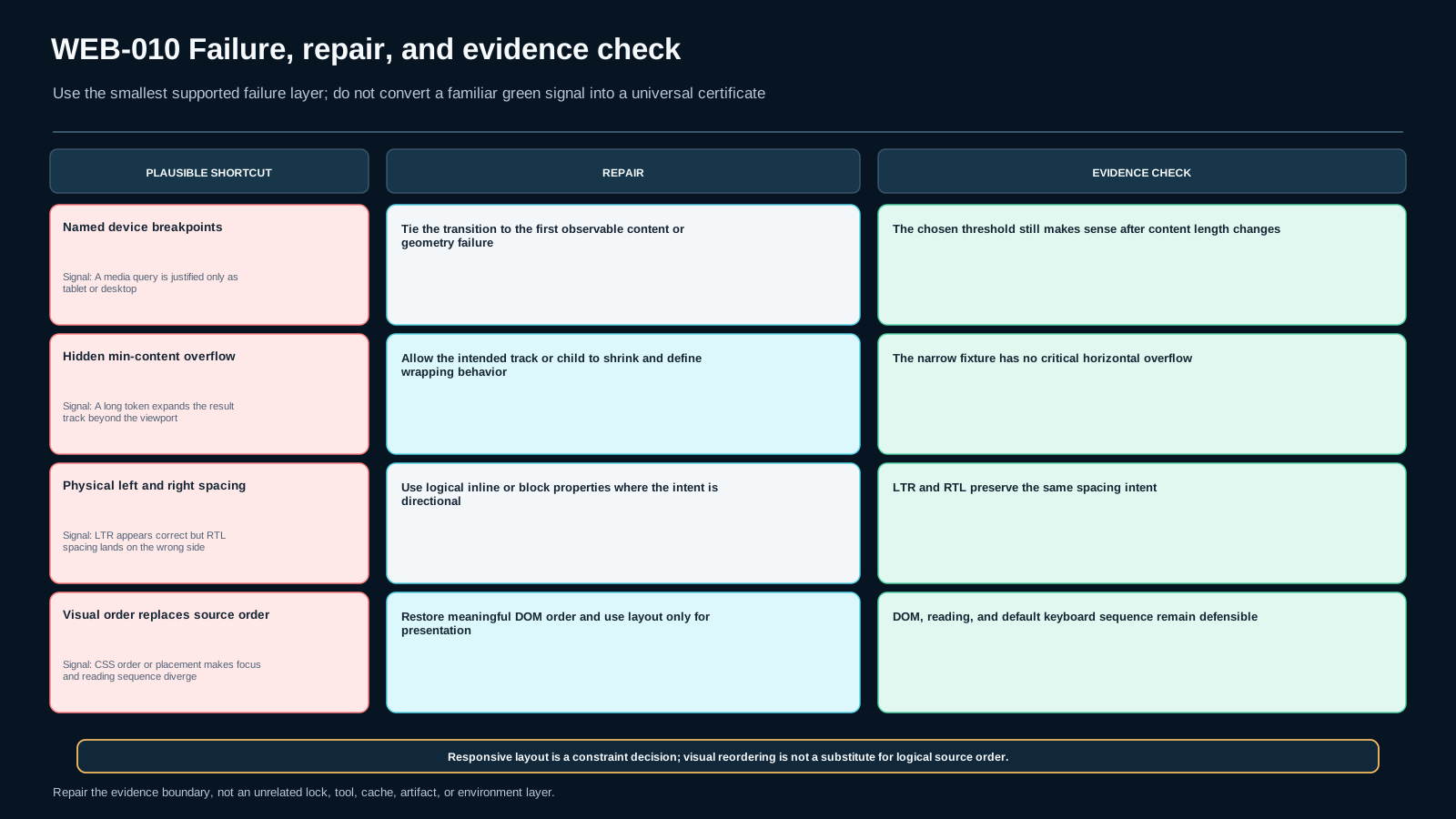
Shortcut 1: “Use Grid for pages, Flex for components”
This rule is attractive because it is easy to remember. It is also too crude. A component can contain a two-dimensional relationship, and a page-level region can have a simple one-axis distribution problem. The layout mechanism belongs to the container that owns a relationship, not to an organizational category such as “page” or “component.”
A pricing comparison component with features aligned across rows and plans across columns may naturally fit Grid. A page-level header with a logo, flexible search, and actions may naturally fit Flexbox. Nested combinations are normal.
The evidence-based replacement for the shortcut is:
- name the relationship the container must preserve;
- identify whether that relationship is primarily one-axis or explicitly two-dimensional;
- choose the smallest model that expresses it clearly;
- state what changed evidence would make the alternative preferable.
Shortcut 2: “If it overflows, add another breakpoint”
A breakpoint changes state. It does not explain why content cannot fit. If the true cause is an item’s minimum inline size, a long token, a replaced element, or a track minimum, moving to a different layout at 700px may hide the bug while leaving it present at 701px—or recreate it in another locale.
Diagnose sizing before adding state transitions. Use the browser’s layout inspection tools if available, but the conceptual questions remain tool-independent:
- Which container owns the available inline size?
- Which child or track claims more than that size?
- Is the claim caused by an explicit
min-*, an automatic minimum, intrinsic content, a fixed width, or an unbreakable descendant? - Should the box shrink, should the content break, should the region scroll, or should the layout change state?
Those are different product decisions.
For a horizontally scrollable data table, overflow may be intentional. For a catalog card title, breaking or truncation may be appropriate depending on product requirements. For a primary page shell, unexplained horizontal viewport overflow is usually evidence of a failed layout contract. The lesson does not prescribe one universal overflow behavior; it requires you to record the chosen behavior and evidence.
Shortcut 3: “overflow: hidden fixes responsive bugs”
overflow: hidden can be a legitimate design choice. It can also erase the evidence of a sizing failure. If an essential action is clipped, the screenshot may look tidy while the feature becomes unusable.
Before clipping, record the root symptom. If the contract says content must remain available, clipping cannot be the repair. If the contract says a decorative bleed should be clipped, it may be exactly right. Again, mechanism follows intent.
Shortcut 4: “Make mobile first in the DOM, then use order for desktop”
Sometimes source order and a visually preferred order happen to differ. Grid placement and Flexbox order can rearrange visual presentation without changing source order. That capability does not mean CSS should routinely compensate for a poor document sequence.
The source should remain meaningful when linearized. If the filter controls must logically precede the results they affect, a DOM with filters before results may work for both wide and narrow layouts: side-by-side at wide widths and stacked at narrow widths. You do not need CSS order at all.
If the design insists on a visual sequence that differs from the meaningful linear sequence, document that trade-off and test the relevant user flows. This lesson’s bounded rule is conservative: do not use visual reordering as a repair for incorrect source order.
The W3C Grid and Flexbox specifications explicitly separate visual reordering from source/speech/sequential navigation behavior. That is why a screenshot cannot prove order integrity.
Shortcut 5: “RTL means add [dir=rtl] and flip every left/right rule”
Manual flipping scales badly. Some physical geometry should not flip; some logical relationships should. A better process begins by classifying intent.
Ask of each directional rule:
- Is this edge physically important, independent of writing direction?
- Or does this mean start/end of the reading or inline flow?
- Is the dimension inline/block-relative?
- Does the component have a nested direction different from the document?
When the intent is flow-relative, logical properties encode it directly. When the intent is physical, keep the physical property and explain why.
A second boundary is equally important: direction: rtl changes directional layout behavior, but mixed-script text can still require bidi-specific markup or isolation. We deliberately do not claim otherwise.
Shortcut 6: “If Flex wraps, it is basically Grid”
A wrapped Flex container can create multiple lines, but the relationship model is still line-by-line and main-axis oriented. Items on separate flex lines do not become a single two-dimensional track system merely because rows appear on screen.
If you need columns to line up across multiple rows, Grid may express the relationship directly. If each row is independent and your main concern is distribution and wrapping, Flexbox may remain the better model. The visual appearance “several rows and columns” is not enough to decide; inspect the alignment contract.
Shortcut 7: “Logical properties make layout automatically internationalized”
Logical properties remove a class of physical-direction assumptions. That is valuable, but internationalization is larger. Longer translations can change intrinsic sizes and therefore break a layout even if every margin is logical. Mixed-direction text can have bidi behavior unrelated to margins. Font metrics, line breaking, number formatting, and localized control labels can all alter constraints.
For this lesson, RTL is a changed-context probe with two purposes:
- expose physical left/right assumptions in layout spacing or placement;
- increase content/geometry variation so responsive decisions are tested beyond the English baseline.
Do not turn a passing RTL screenshot into a claim of complete localization correctness.
A more rigorous decision loop
For any responsive region, use this sequence:
- State the invariant. What source order and user-visible relationship must survive?
- Name the geometry. One-axis distribution, two-dimensional tracks, ordinary document flow, or another mechanism?
- List constraints. Minimum control sizes, intrinsic content, available inline space, direction, wrapping, and product requirements.
- Choose a baseline model. Grid, Flexbox, normal flow, or a bounded combination.
- Find the transition. Change width/content/direction until a stated constraint fails—not until a device label changes.
- Define the responsive state. Change only what the failing constraint requires.
- Probe a failure. Long token, narrower container, direction switch, or deliberate visual reordering.
- Observe. Do not write the conclusion first.
- Repair. Make the smallest change that addresses the diagnosed cause.
- Record residual uncertainty. One browser/session is evidence for that tested environment, not a universal proof about all engines and assistive technologies.
This loop is slower than copying a breakpoint snippet the first time. It is much faster than maintaining unexplained CSS for years.
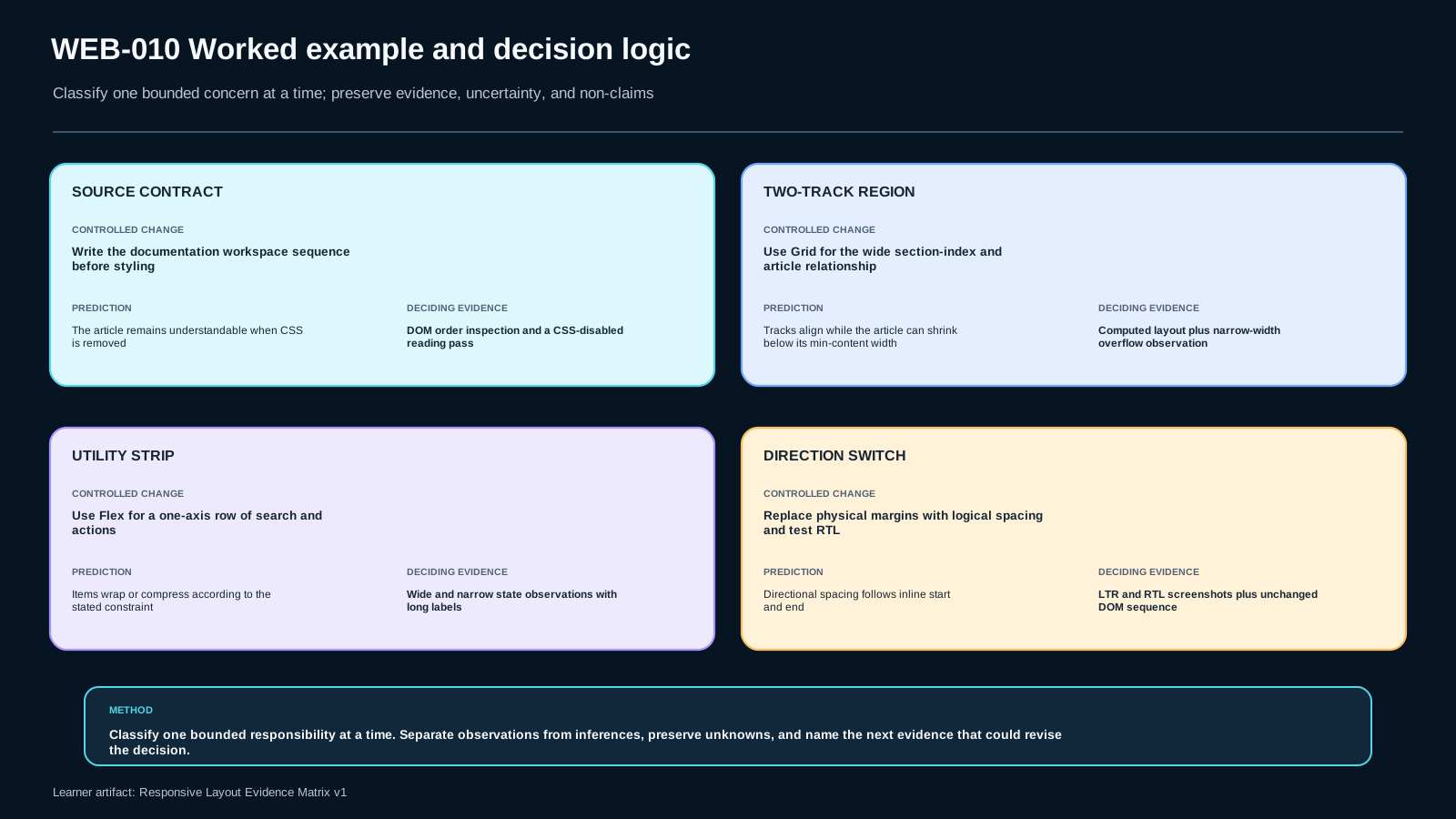
Worked example: a documentation workspace with a section index, article canvas, and utility strip
This worked example deliberately uses a different feature from the executable product-catalog lab. The concepts transfer, but the fixture, selectors, geometry, state thresholds, and final CSS decisions do not. That separation matters: a worked example should teach the reasoning method without becoming a copyable answer to the required lab.
The feature is an internal documentation workspace. On a wide screen it has a section index beside the article. The top utility strip contains a workspace link, a search field, and two actions. On a narrow screen the section index becomes a compact block before the article. The interface must remain understandable in both LTR and RTL, and long API names inside the article must not force the whole page wider than its available inline size.
Step 1: write the source-order contract before the layout
A reduced structure can look like this:
<header class="docs-tools">
  <a class="workspace-link" href="/docs">Engineering Docs</a>
  <form class="docs-search" role="search">
    <label for="docs-q">Search documentation</label>
    <input id="docs-q" name="q" type="search">
  </form>
  <div class="docs-actions">
    <button type="button">History</button>
    <button type="button">Share</button>
  </div>
</header>

<main class="docs-shell">
  <nav class="section-index" aria-label="On this page">
    <!-- section links -->
  </nav>

  <article class="doc-article">
    <h1>Request signing</h1>
    <p>...</p>
    <section class="related-topics">...</section>
  </article>
</main>
The index precedes the article in source because that order is defensible in the narrow presentation too: a reader can encounter the local navigation and then the document it controls. That is a product/semantics decision, not a Grid decision. CSS is allowed to change geometry around that sequence, but it should not silently redefine the sequence just to make a screenshot convenient.
Before writing layout CSS, state the invariants:
- the index and article remain separate regions;
- the article remains the primary reading surface;
- local navigation precedes the article in the chosen source contract;
- utility actions remain reachable without depending on visual reordering;
- flow-relative spacing should follow document direction unless a requirement is explicitly physical.
Step 2: classify the geometry per container
The main workspace has a clear two-track relationship at wide widths: an index track and a flexible article track. Grid is a natural candidate because both tracks participate in one two-dimensional placement model.
The utility strip is different. Its dominant requirement is distribution along one row, with the search region allowed to grow and actions kept together. Flexbox is a reasonable baseline. If later requirements demand a precise second row with aligned columns, that new geometry can justify changing the mechanism. Starting with Flexbox does not bind the feature forever.
The related-topic links inside the article are another independent container. If they are cards that should form repeated tracks, Grid may fit. If they are merely a wrapping sequence of tags, Flexbox or ordinary inline flow may be clearer. The decision is local to the relationship being expressed.
This is the reusable rule: choose the layout model for the container’s geometry, not for the page’s brand, framework, or the developer’s favorite API.
Step 3: make the wide two-track relationship explicit
One possible wide-state baseline is:
.docs-shell {
  display: grid;
  grid-template-columns: minmax(12rem, 16rem) minmax(0, 1fr);
  gap: clamp(1rem, 2.5vw, 2rem);
  align-items: start;
}

.doc-article {
  min-inline-size: 0;
}
There are two different ideas here. The first track has a bounded range because the index needs useful room but should not consume arbitrary space. The article track is flexible. Giving its minimum track size an explicit zero allows the track to participate in shrinkage instead of assuming that an automatic minimum must always win.
min-inline-size: 0 lives at the item boundary rather than the track-definition boundary. It is not a ritual declaration to paste everywhere. If a descendant’s intrinsic contribution or an item’s automatic minimum is preventing intended shrinkage, that declaration can be relevant. If the evidence shows the problem lives elsewhere, keep the repair at the actual boundary.
The point is not the exact 12rem, 16rem, or gap values. Those are example inputs. The engineering question is which minimums are product constraints and which are accidental consequences of content or default sizing.
Step 4: derive a state transition from a failed constraint
Suppose the index has an accepted minimum useful size, the article has an accepted minimum readable size for this product, and the gap has a design-system minimum. Reduce the available inline size gradually.
At some point those requirements cannot coexist as two columns. That is the reason for a state change. The reason is not “tablet.” A media query may encode the observed transition, but the evidence record should preserve the underlying constraint.
For this documentation fixture, imagine the transition was observed around a particular width after testing realistic labels. A bounded implementation could change only the main relationship:
@media (max-width: 56rem) {
  .docs-shell {
    grid-template-columns: minmax(0, 1fr);
  }

  .section-index {
    border-block-end: 1px solid currentColor;
    padding-block-end: 0.75rem;
  }
}
The numerical threshold is an implementation observation for this fixture. If translated labels, font metrics, index depth, or product requirements change, the transition may need to move. A stronger evidence note says why the two-column mode became unacceptable, not which device marketing name was attached to the width.
Step 5: keep the utility strip’s one-axis contract visible
A simple wide baseline can remain Flexbox:
.docs-tools {
  display: flex;
  align-items: center;
  gap: 0.75rem;
  padding-block: 0.75rem;
  padding-inline: 1rem;
}

.docs-search {
  flex: 1 1 24rem;
  min-inline-size: 10rem;
}

.docs-actions {
  display: flex;
  gap: 0.5rem;
}
Now test the actual content. If the workspace label, minimum search width, and action group cannot coexist, several repairs are possible. The utility strip could wrap; the search could move to a new row; one action could move into a menu if the product contract allows it. The smallest valid repair depends on the requirement.
Do not infer “Flexbox failed.” A particular Flex configuration failed a particular constraint. You could keep Flexbox and change wrapping/basis rules, or move to Grid if a stable row/column relationship becomes the clearest model. That distinction keeps tool choice evidence-based.
Step 6: express directional intent, not English-screen coordinates
Imagine the section index uses a subtle accent line on the side adjacent to the article. If the intent is “the article-facing logical edge,” encode that intent in flow-relative terms rather than assuming that edge is always the physical right or left.
.section-index {
  border-inline-end: 2px solid currentColor;
  padding-inline-end: 1rem;
}
In an RTL document, inline start and end map differently. The CSS expresses a relationship rather than a coordinate copied from an LTR screenshot.
But logical properties are not a ban on physical values. A decorative watermark intentionally pinned to the physical top-left of a screenshot frame may genuinely have physical intent. Record the reason. The test is whether the property matches the product relationship, not whether the token contains the word left.
Step 7: test intrinsic-content pressure without turning it into a breakpoint problem
Documentation pages often contain long method names, URLs, hashes, or code fragments. Suppose one related-topic card contains an identifier with no ordinary break opportunity. If the page becomes horizontally scrollable, first locate the boundary.
Possible causes include:
- an item retaining an automatic minimum inline size;
- a track whose minimum is larger than intended;
- a descendant with fixed inline size;
- genuinely unbreakable content whose own wrapping policy must change.
A targeted probe might compare the result when only one boundary changes. If allowing the article item to shrink changes nothing, that observation falsifies the hypothesis that the item minimum was the governing cause. If enabling a break opportunity on the identifier alone removes the overflow, the evidence points elsewhere.
This is why responsive debugging should keep observation separate from inference. “The viewport scrolls horizontally” is an observation. “The Grid track is the cause” is a hypothesis until a targeted change supports it.
Step 8: treat visual reordering as a dangerous shortcut, not a free responsive tool
Suppose someone wants the article to appear before the section index at one width and reaches for order or explicit Grid placement while leaving the source sequence unchanged. The screenshot may match the design request, but the change can create a different visual sequence from the document’s source/sequential order.
The correct response is not an automatic rule that “CSS reordering is forbidden.” The response is to revisit the contract. If the information genuinely requires a different logical sequence in that state, the content/source architecture may need redesign. If only decoration or non-semantic placement changes, CSS placement can still be appropriate. What CSS must not do is pretend that visual position has rewritten reading or default sequential navigation order.
Record both observations independently: the source sequence and the visual sequence. If interactive controls are involved, also observe default focus progression for the tested page. That evidence is narrower and more useful than saying “accessibility looks fine.”
Step 9: compare alternatives instead of canonizing the example
The main shell could be implemented with other mechanisms. A flex row could place the index and article beside each other, then switch direction or wrap at a constraint. That may be acceptable if cross-axis track alignment is not part of the requirement. Grid makes the explicit two-track relationship easier to inspect here, but the example does not establish a universal winner.
Likewise, the utility strip could become Grid in a product that requires exact alignment of the search field with content tracks below. That would be a new relationship and therefore new decision evidence.
A good evidence matrix should include at least one plausible alternative and the observation or requirement that would make you switch. Tool choice becomes a falsifiable decision rather than a personal identity.
Step 10: close the example with evidence, not with a “final CSS” ritual
A defensible record for this documentation workspace would contain statements like:
Region: docs-shell
Source-order contract: section index precedes article and remains meaningful in narrow flow
Layout problem: coordinated navigation/article tracks in wide state
Chosen model: Grid
State constraint: two useful minimums + gap stop fitting in available inline size
Observation: wide state stable in tested content; narrow transition required after constraint collision
Directional rule: article-facing spacing expressed with inline-end semantics
Inference: Grid expresses the coordinated-track relationship clearly in this feature
Residual limitation: tested content and browser do not prove every translation or assistive-technology combination
Notice what is absent: “use these exact selectors and breakpoints in every responsive page.” The example gives you a reasoning pattern and a different fixture. The executable catalog lab still requires you to inspect its own starter, discover its own failed constraints, choose its own repair, and produce its own evidence.
Failure modes and deliberate mutations
A strong lab does not only prove that the final CSS works. It proves that the evidence system can detect plausible wrong implementations.
Failure A: min-content pressure creates hidden horizontal overflow
Mutation: remove the shrinkability rule from the results region or introduce a long unbreakable token.
Bad diagnosis: “The mobile breakpoint is wrong.”
Better diagnosis: identify the exact item/track whose minimum contribution exceeds the available inline size. Record scroll width versus client width or another inspectable overflow observation. Then test the smallest sizing/content repair.
Why this matters: adding breakpoints can hide the boundary without understanding it. The bug may reappear at another width or locale.
Failure B: physical directional spacing leaks an LTR assumption
Mutation: replace a flow-relative margin with margin-left and switch the fixture to RTL.
Expected evidence: the space remains on the physical left even when the intended semantic relation was “after/before this item in the inline flow.”
Repair: restore a logical margin if the intent is genuinely flow-relative.
Residual boundary: a physical rule can be correct for a physically anchored design. The mutation only proves the logical rule for this contract.
Failure C: visual order diverges from source order
Mutation: apply order: -1 to a control in a flex context or explicit Grid placement that makes a later DOM element appear first.
Observation: visual sequence changes while the DOM sequence remains unchanged. Where interactive controls participate in default sequential navigation, tab order may reveal the same divergence.
Repair: remove the CSS reorder if source order should already express the meaningful sequence; or revisit the document/design contract rather than pretending CSS changed semantics.
Boundary: we are not designing custom focus management here.
Failure D: a breakpoint is tied to a device label instead of a failure
Mutation: change text to a longer locale or increase the browser base font size while keeping the same “tablet” breakpoint.
Observation: the layout can fail before or after the named threshold because the content constraint changed.
Repair: document the actual constraint and adjust the state logic accordingly. The final media-query number may still be fixed, but its rationale is content/layout based.
Failure E: Grid/Flex choice is defended by habit
Mutation: ask the implementation to support a new relationship: e.g., product metadata must align in common columns across rows, or a toolbar’s items only need one-axis distribution with wrapping.
Observation: one model may become more complicated because it is expressing a relationship it does not naturally own.
Repair: reconsider the container-level layout model. This is a design decision, not a syntax failure.
Failure F: “fix” overflow by hiding it
Mutation: add overflow: hidden to the container without changing the cause.
Observation: horizontal scroll may disappear, but important content can be clipped. The matrix must record content availability, not only the absence of a scrollbar.
Repair: use clipping only if clipping is actually part of the product contract. Otherwise address sizing, wrapping, or layout state.
Failure G: RTL screenshot passes, so internationalization is declared complete
Mutation: introduce mixed-direction content or a longer translation.
Observation: logical spacing may still be correct while text direction or intrinsic size reveals another class of problem.
Repair: narrow the conclusion. This lesson can prove layout-direction behavior in the tested case; it cannot certify all bidi or localization behavior.
The purpose of these mutations is epistemic: they show whether your evidence would catch a wrong implementation. If every mutation “passes,” your checks are probably too weak.
For experienced programmers: treat CSS as a constraint system, not coordinate paint
If your background is desktop UI, game UI, native mobile, or server-rendered enterprise applications, responsive CSS can feel unpredictable because the browser is not simply placing widgets at explicit coordinates. The layout engine resolves constraints contributed by the formatting context, intrinsic content, available space, writing mode, minimum sizes, and author rules.
A useful mapping is:
- Grid tracks resemble an explicit relationship system between rows/columns more than manual x/y positioning.
- Flex items resemble a distribution algorithm along a primary axis with flexible bases and alignment rules.
- Intrinsic sizing means children participate in the constraints; the parent does not own all geometry unilaterally.
- Logical axes mean “horizontal” is not the only meaningful abstraction. Inline/block can map differently under writing modes and direction.
- Media queries are state gates. They should encode a documented transition, not become an unstructured override layer.
Experienced developers often make one of two mistakes.
The first is overengineering: introducing a CSS framework, JavaScript resize observer, layout component abstraction, or many design-system tokens before proving the native layout model cannot express the bounded requirement. That adds indirection before the contract is understood.
The second is false confidence from prior recipes: knowing that min-width: 0 fixes many Flex/Grid overflow bugs and applying it everywhere. The property is valuable, but the engineering skill is recognizing the automatic minimum boundary and proving the rule is necessary at the correct box.
For code review, replace style preference questions with evidence questions:
- What relationship does this container own?
- Which content constraint defines the narrow state?
- Why does this value exist?
- Does the rule encode physical geometry or logical flow?
- What is the DOM/source sequence?
- Can a long localized value exceed the assumed minimum?
- What deliberate mutation has been run?
- Which observation would make us choose another layout model?
This style of review scales better than arguing about whether “Grid is cleaner.”
Avoid abstraction that erases CSS meaning
A component API such as:
<Stack direction="horizontal" gap="md" collapseAt="tablet" />can be useful, but it can also hide the actual contract. What does tablet mean? Does horizontal map to physical or logical direction? Is the implementation Flexbox, Grid, or something else? What happens under RTL? What is the minimum usable child width?
The lesson does not reject abstractions. It requires the abstraction to preserve enough semantics that evidence is still possible. A design-system token might be justified if its documentation states the constraint it represents and if the component can still be tested under changed content/direction.
CSS source is not the final oracle
A static review can catch suspicious left, right, order, fixed widths, and unexplained breakpoints. It cannot prove runtime layout behavior for actual content. Conversely, a screenshot can show one rendered arrangement but not source order or why a track sized that way.
Use both source inspection and rendered observation. For high-confidence bugs, add a repeatable automated or semi-automated probe, but keep the claim bounded to what that probe measures.
Alternatives and trade-offs: choose mechanisms from the contract
Grid versus Flexbox
Use this table as a decision aid, not a scoring system.
| Question | Grid tends to fit when… | Flexbox tends to fit when… |
|---|---|---|
| What relationship matters? | rows and columns must coordinate | distribution along one principal axis dominates |
| Do items need shared tracks across rows? | yes, explicit track alignment matters | no, each line/group can distribute independently |
| Is wrapping the main behavior? | track count/placement is the model | one-axis items wrapping into lines is the model |
| Do regions span explicit areas? | often natural | possible through nesting, but not the core model |
| Does one item absorb free space in a row? | possible | often direct with flex growth |
Many designs can be implemented either way. Code readability, browser behavior, team conventions, and future requirements can shift the decision. Record the reason, not just the property.
Intrinsic responsiveness versus explicit state changes
Patterns such as auto-fit/minmax() can let Grid adjust the number of columns without a media query. Flex wrapping can also respond continuously to space. This is useful when the desired behavior is truly “fit as many items as possible above a minimum.”
Explicit media-query states are useful when more than geometry changes: a filter becomes a disclosure, a header changes row relationships, a control label changes, or a product rule defines a distinct state.
Do not treat “no media queries” as a quality metric. The question is whether the behavior is predictable and tied to the product contract.
Logical properties versus physical properties
Prefer logical properties when the requirement is flow-relative. Keep physical properties when the requirement is physical. A brand ribbon anchored to the physical top-left of artwork may be physical. Spacing between icon and label in reading order is logical.
The trade-off is not browser novelty versus tradition; it is whether the property expresses the intended coordinate system.
Reordering versus source restructuring
Visual reordering is useful for presentation. It becomes risky when readers or keyboard users experience a different logical sequence. If a design requires substantial reordering, alternatives include:
- improve source order so both presentations work naturally;
- change the visual design to respect the meaningful sequence;
- duplicate purely decorative content when appropriate rather than moving interactive semantics;
- document and test a bounded divergence when it is genuinely necessary.
Do not duplicate interactive controls merely to get two positions without considering state synchronization and accessible relationships. That would create new problems outside this lesson’s scope.
Fixed widths versus bounded flexible widths
A fixed sidebar can be correct if its content and product requirements truly fix it. A fully fluid region can be correct if it preserves readability and controls. Common middle-ground tools include minmax(), min(), max(), clamp(), flex-basis, minimum inline sizes, and max inline sizes.
The principle is to express a bounded range when the requirement itself is bounded.
Container responsiveness
Some systems use container queries rather than viewport media queries so a component responds to its allocated space. That can better match component-local constraints. Container queries are not part of this lesson’s frozen source set, so we do not expand this lesson into a container-query tutorial here. The transferable idea remains: state should be tied to the space/constraint that actually governs the component.
Guided practice and executable lab
The lab WEB010-LAB1 contains a local product-list/header fixture. The starter is intentionally wrong in ways that are visible only after changed-context probes. You are expected to edit HTML/CSS only where the owned responsive contract requires it.
Phase 1 — write the contract before editing CSS
Complete formative checkpoint WEB-010-AF1.
For each region—header, main shell, product grid, card actions—record:
- meaningful source sequence;
- dominant geometry;
- minimum useful content constraints;
- direction intent;
- observation you will use as evidence.
Do not write “mobile layout” as a constraint. Replace it with something inspectable, such as “filter minimum + result minimum + gap cannot fit in the available inline size.”
Phase 2 — baseline wide LTR
Open the fixture at a wide viewport. Record the environment and current failures before repairing them. A baseline is allowed to fail; it is evidence of the starter state.
Inspect:
- header distribution;
- filter/results relationship;
- number and width of card tracks;
- viewport horizontal overflow;
- source order in the DOM;
- any physical directional spacing.
Create matrix rows for the regions you will change.
Phase 3 — narrow-width probe
Reduce the viewport gradually. Do not jump directly to one preset device width. Identify the first region whose contract becomes unacceptable.
Record:
- approximate transition size in this fixture;
- which constraint fails;
- whether the failure is track geometry, intrinsic content, fixed sizing, or another cause;
- whether a state change or local sizing repair is appropriate.
Then implement the smallest repair.
Phase 4 — long-content mutation
Use the provided control or edit the fixture data so a card contains a long unbroken identifier. Complete formative checkpoint WEB-010-AF2 before running it: predict what should fail and what observation would falsify the prediction.
Possible measurements include:
const root = document.documentElement;
console.log({
  clientWidth: root.clientWidth,
  scrollWidth: root.scrollWidth,
  hasHorizontalOverflow: root.scrollWidth > root.clientWidth
});
This is one observation. It does not tell you which descendant caused the overflow. Inspect the relevant region before choosing a repair.
Phase 5 — RTL changed context
Switch the fixture direction to RTL. Re-run the width states. Record physical rules that no longer express the intended relation. Convert only flow-relative intent to logical properties.
Do not blindly replace every left/right token. Explain any physical property that remains.
Phase 6 — visual/source order mutation
Apply the provided mutation that visually moves a later interactive region earlier. Compare:
- DOM/source sequence;
- visual sequence;
- default sequential focus movement for the existing controls.
Remove the mutation and record why the repair belongs in source/layout design rather than a visual-order patch.
Phase 7 — independent transfer
The transfer fixture changes several variables at once:
- RTL is the initial direction;
- localized titles are longer;
- the filter becomes an inline disclosure above results at the narrow state;
- the source sequence must remain meaningful;
- the visual result must not depend on copying the exact worked-example breakpoint.
Complete it without using a hidden solution. Your evidence matrix is the deliverable.
What the lab checker can and cannot prove
The included public checker verifies packaging, probe availability, JSON structure, required evidence fields, and completion flags. It does not execute browser geometry, decide whether a CSS mechanism is semantically correct, prove that overflow is absent, or certify visual/accessibility quality. Those claims require the recorded browser/DOM observations and the evidence review boundary. A checker PASS is therefore evidence about the checks it actually ran, not a substitute for the lab observations.
Verification: what counts as evidence
The artifact exists to keep four categories separate: observation, inference, decision, and limitation.
Observation
An observation is something you actually inspected in the recorded environment.
Examples:
- “At viewport inline size 420px,
document.documentElement.scrollWidthis 462px whileclientWidthis 420px.” - “After switching
dir=rtl, the icon-label space remains on the physical right because the rule ismargin-right.” - “The DOM shows filter before results; CSS
ordermakes results appear first.” - “Removing
min-inline-size: 0from.resultsreproduces horizontal overflow in this fixture.”
Inference
An inference explains what you think the observation means.
Example:
- “The overflow is consistent with the results item preserving a minimum inline-size contribution that prevents the intended track shrinkage.”
That statement is stronger when a targeted mutation changes the result as predicted. It is still not a universal claim about all possible descendants.
Decision
A decision states what implementation you choose for this contract.
Example:
- “Use Grid for the wide filter/results shell because the requirement is an explicit two-track relationship; switch to one column when the accepted minimum widths no longer fit. Use Flexbox inside the action group because the relationship is one-axis distribution.”
Residual limitation
A limitation prevents the evidence from becoming an overclaim.
Examples:
- “Observed in Chromium X on this fixture; not a universal browser/assistive-technology certification.”
- “RTL layout spacing was tested; mixed-script bidi correctness was not assessed.”
- “Default sequential focus order was observed; custom keyboard-widget behavior is outside this lesson.”
Minimum scenario matrix
For the main lab, collect at least these changed contexts:
| Width state | Direction | Long-content mutation | Order mutation | Required conclusion |
|---|---|---|---|---|
| wide | LTR | off | off | baseline relationship works or failure is documented |
| narrow | LTR | off | off | responsive state preserves contract |
| narrow | LTR | on | off | intrinsic/overflow boundary is tested |
| wide or narrow | RTL | off | off | flow-relative spacing is tested |
| narrow | RTL | on | off | combined changed context survives |
| chosen state | either | off | on | evidence detects visual/source-order divergence |
This is a minimum evidence design, not a requirement to test only six cases.
Automated evidence without false authority
Automation is useful when it measures a bounded observable. For example, a script can compare scrollWidth and clientWidth, inspect computed CSS values, or assert that a known source sequence remains present in HTML. The danger begins when a test result is promoted into a larger conclusion than it measures.
A test named responsive_ok = true is weak if nobody can explain its oracle. Prefer checks named after the actual condition:
no_viewport_horizontal_overflow_at_420px
filter_precedes_results_in_source
rtl_inline_spacing_maps_to_expected_computed_side
order_mutation_is_detected
The evidence matrix should point to these observations rather than treating the tool name as proof.
Final evidence gate
Before claiming the lesson complete, answer all of these:
- Can I explain why each container uses its layout model?
- Can I name the real constraint behind each responsive state?
- Did I test content near or beyond the assumed minimum?
- Did I switch direction?
- Did I inspect source order separately from visual order?
- Did at least one deliberate mutation fail in the expected way?
- Did the repair restore the contract without unrelated rewrites?
- Did I separate observed facts from inferred causes?
- Did I state one residual limitation?
- Did I complete the changed-context transfer independently?
If any critical answer is no, the matrix is incomplete.
Assessment and transfer
The assessment is deliberately not a syntax quiz. Knowing the names of grid-template-columns or flex-grow is insufficient if you cannot choose and verify them under changed constraints.
S1 — retrieval
State a bounded Grid-versus-Flexbox rule and explain why a breakpoint should be justified by a content/layout constraint rather than a device name. Add one non-claim so your rule cannot be read as a universal winner statement.
S2 — application
Repair the primary lab fixture for wide/narrow and LTR/RTL contexts. Submit the complete evidence matrix. This is blocking because the lesson is executable: prose without a working artifact does not demonstrate the skill.
S3 — diagnosis
Diagnose a changed-context Flex layout where a nested code sample with one long unbreakable token forces a flexible content pane wider than its container. Do not begin with a repair. Separate the flex-item minimum, content breakability, and fixed-descendant hypotheses; state what would falsify your leading diagnosis, then choose the smallest test repair.
S4 — decision
A header needs one-axis distribution while the page shell needs explicit filter/result track alignment. Defend either a mixed Grid/Flex design or a coherent alternative. Include the trade-off and evidence that would make you change the choice.
S5 — independent transfer
The transfer catalog starts in RTL, uses longer localized content, and changes the narrow filter interaction. Preserve the meaningful source sequence, avoid critical horizontal overflow, choose mechanisms from constraints, run a deliberate mutation, repair it, and record one limitation. Do not copy the worked example’s exact breakpoint or CSS structure merely because it passed there.
The transfer is the strongest completion signal because it changes multiple surface details while preserving the underlying contract. If you can only repeat the worked example, the lesson has not transferred.
Remediation logic
If S1 fails, return to the mental model and foundation layer. If S2 fails, return to the worked example and evidence section. If S3 fails, return to intrinsic sizing and the failure probes. If S4 fails, revisit the alternatives/trade-offs section. If S5 fails, identify which critical dimension collapsed—model, constraint, logical direction, order, or evidence—and repair that dimension before retrying the changed context.
Do not remediate by revealing a canonical final stylesheet. The learner must retain the engineering decision.
Standards, freshness, and the limits of this lesson
This lesson is bound to three declared W3C sources. They are used narrowly.
CSS Grid Layout Module Level 2 — S-CSS-GRID2
Source: https://www.w3.org/TR/css-grid-2/
Used for the bounded claims that Grid is optimized for two-dimensional layout relationships and that visual reordering/placement is not a substitute for correct source ordering. The current W3C technical report is a draft-track publication and can evolve; the lesson therefore records a review date rather than treating every detail as timeless.
CSS Flexible Box Layout Module Level 1 — S-CSS-FLEX1
Source: https://www.w3.org/TR/css-flexbox-1/
Used for Flexbox’s axis-oriented distribution/alignment model and for the separation between visual order and source/speech/sequential navigation order. It does not authorize a claim that Flexbox is always the correct tool for one-dimensional-looking designs.
CSS Logical Properties and Values Module Level 1 — S-CSS-LOGICAL1
Source: https://www.w3.org/TR/css-logical-1/
Used for writing-mode-relative logical dimensions and directional mappings such as inline/block start/end. It does not authorize the claim that logical properties solve all RTL, bidi, localization, or text-order problems.
Non-claims that must survive every summary
- Grid is not universally better than Flexbox, and Flexbox is not universally better than Grid.
- Responsive design does not require a universal list of phone/tablet/desktop breakpoints.
- CSS visual reordering does not rewrite the DOM/source sequence or automatically redefine speech/default sequential navigation order.
- Logical properties do not automatically solve all RTL or bidi correctness.
- A passing screenshot is not proof of the full responsive contract.
- One browser observation is not a universal statement about every browser, assistive technology, writing mode, or product content set.
Review boundary
The practical method—state the contract, choose a layout mechanism, run changed-context probes, separate observation from inference—is relatively stable. Specific CSS specification wording and browser behavior can evolve. Re-review the declared sources when their review date arrives, when a cited standard materially changes, or when the executable fixture no longer behaves as documented in current standards-capable browsers.
The strongest conclusion you should leave with is not “I know Grid and Flex.” It is: I can explain what layout relationship I am implementing, why it changes state, how direction affects the intent, how source order remains protected, and what evidence proves the result in the tested context.
Assessment
There is no answer key in this lesson pack; answer it yourself and mark honestly. "Needs review" sends the lesson to your review queue.
WEB-010-S1 retrieval
State a bounded rule for choosing Grid versus Flexbox, then give one reason a breakpoint should be tied to a content/layout constraint rather than a device label. Include one explicit non-claim.
WEB-010-S2 application
Implement the product-list/header fixture so it works at the required wide and narrow states in both LTR and RTL. Complete Responsive Layout Evidence Matrix v1 with the chosen layout model for each region, the constraint that caused each state change, logical-property use, overflow evidence, and source-order evidence.
WEB-010-S3 diagnosis
A settings workspace uses a Flex row for navigation and a content pane. At a narrow width, a nested code sample containing one long unbroken token makes the content pane force the row wider than its container even though the pane is declared flexible. Diagnose the failure before proposing a repair: distinguish the flex-item automatic minimum, the nested content’s break behavior, and any fixed descendant constraint; state one observation that would falsify your leading diagnosis and the smallest repair you would test first.
WEB-010-S4 decision
A header contains a brand, search field, and actions. The brand and actions mainly need one-axis distribution, while the page body needs stable alignment between filter and results columns. Defend a mixed Grid/Flex decision or a single-model alternative. State the trade-off, the logical-direction rule, and evidence that would make you change your decision.
WEB-010-S5 transfer
Independently repair a changed catalog: the filter becomes an inline disclosure above results at narrow width, card titles include long localized text, and the document starts in RTL. Preserve the original DOM/source sequence, choose layout mechanisms from constraints, avoid critical horizontal overflow, and submit a complete evidence matrix including one deliberate mutation and repaired result.
Assessment rubric
Critical dimensions
- Contract correctness: mechanism choice is tied to the actual layout geometry and content constraints.
- Evidence quality: observations, mutations, repairs, width/direction states, and residual limitations are traceable.
- Direction correctness: logical start/end intent is not silently encoded as physical left/right without justification.
- Order integrity: visual rearrangement does not substitute for correct source/DOM order.
- Transfer independence: the changed-context case is solved without copying a decisive worked-example answer.
Decision rule
A passing implementation may use different CSS from the worked example. It fails if a critical dimension is unsupported, hidden by visual-only proof, or repaired by violating source-order/direction boundaries. AI-generated prose is not execution evidence.
References & freshness
Case studies
Lab files
Goal
Repair and defend a responsive product-results fixture across wide and narrow constraints and both ltr and rtl. The goal is not to make the page merely look acceptable. You must make a bounded layout decision, observe browser/DOM behavior, run a deliberate failure mutation, repair it, and record the evidence in Responsive Layout Evidence Matrix v1.
Starting condition
The starter is intentionally imperfect. It contains several plausible but unsafe choices. Do not replace the whole fixture with a framework or a completely different page. Work inside the bounded fixture so that evidence before and after each repair remains comparable.
The starter intentionally does not tell you which region must use Grid or Flexbox, which breakpoint value is correct, or which exact CSS declaration is the canonical repair. Those decisions must be justified from the layout constraints you observe.
Required states
Evaluate at least these four combinations:
- wide +
ltr - narrow +
ltr - wide +
rtl - narrow +
rtl
Use the direction control in the page. Resize the browser or its container rather than treating a device name as the reason for a breakpoint.
Required failure probes
Run all three probes. Predict the result before observing it.
- Enable Long identifier. Determine whether intrinsic/min-content sizing creates critical horizontal overflow and identify the boundary where the problem originates.
- Toggle
ltrandrtl. Inspect whether spacing and placement express logical start/end intent or accidental physical left/right assumptions. - Enable Visual reorder mutation. Compare visual sequence with DOM/source sequence. Do not “repair” semantic source order by relying on visual reordering.
Evidence to record
Copy Responsive_Layout_Evidence_Matrix_v1_template.json into your working evidence file and record:
- the region and source-order contract;
- the actual layout problem;
- your chosen model and its bounded rationale;
- the constraint that causes a responsive state change;
- logical-property decisions;
- observed overflow and visual order;
- observed DOM/source order and default focus sequence;
- one deliberate mutation and its observed result;
- the smallest repair you tested and the observed repair result;
- one residual limitation;
- one changed-context transfer result.
Keep observation separate from inference/decision.
Acceptance boundary
A strong submission demonstrates all of the following without exposing a hidden answer key:
- no critical horizontal overflow in the required repaired states;
- direction changes do not require a duplicated left/right stylesheet;
- logical DOM/source order remains defensible;
- the chosen Grid/Flex/normal-flow mechanism is justified by the geometry of the region, not habit;
- at least one failure mutation is observed and repaired;
- the transfer fixture is handled independently;
- one residual limitation is stated.
Local execution
Open starter/index.html in a standards-capable browser. No network access, package manager, build system, server, account, or credential is required.
run_checks.py performs only public structural/evidence checks: required files/probes, JSON validity, the full public row-field contract, and completion flags. It does not execute browser geometry, determine whether your CSS is semantically correct, or contain the hidden expected solution.
Public checker command
From this learner/ directory run python run_checks.py --structure-only before editing. After completing evidence/learner_evidence.json, run python run_checks.py. The checker remains structural/evidence-only; browser observations are still learner evidence.
Lesson media & slides
Teaching files (download)