وب مدرن، رابط کاربری و تجربهی وب · فصل ۲ — HTML، CSS، Responsive و RTL · 37
Semantic HTML and Accessible Structure
Build a bounded page structure with native semantic HTML first, preserve programmatically determinable relationships, and verify structure independently from visual styling. میتواند «HTML Semantic و Accessible Structure» را در یک feature محدود طراحی/پیادهسازی کند و correctness، accessibility یا failure behavior مرتبط را اثبات کند.
Lesson summary
Build a bounded page structure with native semantic HTML first, preserve programmatically determinable relationships, and verify structure independently from visual styling.
میتواند «HTML Semantic و Accessible Structure» را در یک feature محدود طراحی/پیادهسازی کند و correctness، accessibility یا failure behavior مرتبط را اثبات کند.
This lesson produces
میتواند «HTML Semantic و Accessible Structure» را در یک feature محدود طراحی/پیادهسازی کند و correctness، accessibility یا failure behavior مرتبط را اثبات کند.
Who it is for
Foundation
Worked baseline, explicit evidence table, safe local fixture and one guided failure probe.
Repair
Reduce to one failing contract, observe evidence, repair, then restore full case.
Experienced
Skip syntax walkthrough; require independent implementation, mutation evidence and residual-risk statement.
Prerequisites
A page can look correct and still expose the wrong structure
Imagine a polished checkout page. The title is a large bold <div>. The navigation is a row of styled generic containers. Form prompts sit visually beside inputs but are not programmatically associated. A payment group is separated by spacing and color, yet nothing in the DOM expresses that relationship. A sighted mouse user may complete the task, but the structure does not reliably survive a screen reader, a user stylesheet, or CSS removal.
This lesson builds Semantic Structure & Accessibility Evidence Record v1 and an executable local lab. The contract is bounded: use native semantic HTML where it correctly expresses meaning, preserve programmatically determinable relationships, and verify structure independently from visual appearance.
HTML owns structure; CSS appearance is not structural proof
WEBF-002 is the hard prerequisite: HTML, CSS, and JavaScript have different responsibilities. Carry one rule forward: CSS can make a generic element look like a heading, landmark, label, or button, but appearance does not change the element's programmatic semantics.
This lesson does not claim that semantic HTML alone guarantees WCAG conformance. It does not teach every ARIA pattern, every screen-reader behavior, or every accessibility criterion. It owns semantic structure, names/relationships, and evidence for a compact bounded feature.
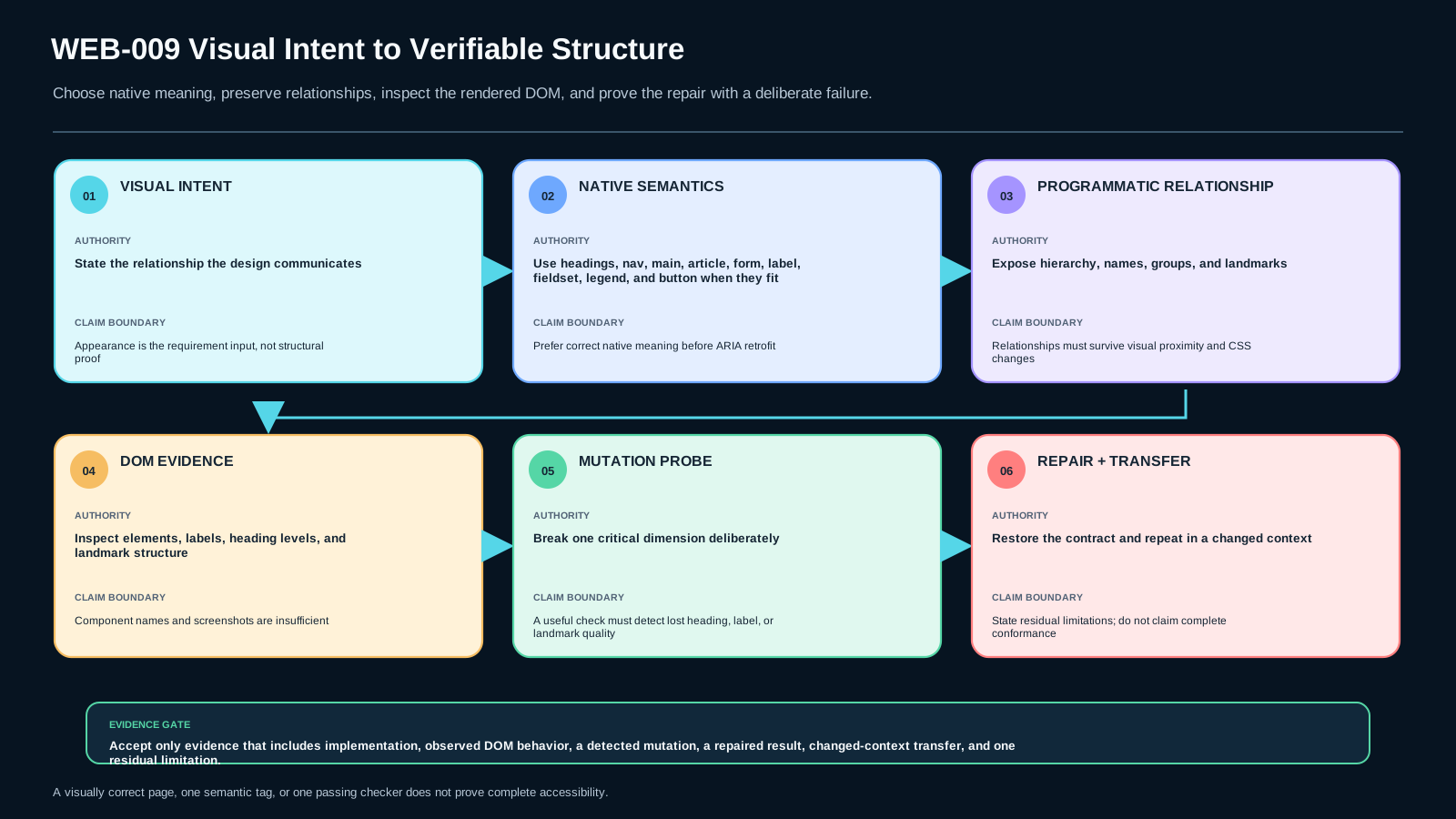
Follow the chain: visual intent → DOM semantics → relationships → evidence
WCAG 2.2 Success Criterion 1.3.1 requires information, structure, and relationships conveyed through presentation to be programmatically determinable or available in text. [S-WCAG-131]
That gives a practical reasoning chain:
- Visual intent: what relationship does the design communicate?
- DOM semantics: which native element or justified ARIA role expresses that relationship?
- Accessible relationship/name: how does a control, group, landmark, heading, table, or figure get its programmatic identity?
- Verification evidence: what DOM inspection, accessibility-tree observation, deterministic check, or assistive-technology test shows that the relationship exists?
The chain is stronger than “the page looks right.” It also prevents the opposite error: adding roles everywhere does not automatically improve accessibility.
Prefer native semantics when they match the job
Use headings for document hierarchy, not font size. Use <nav> for a navigation region, <main> for primary content, <article> for a self-contained article when that meaning is present, and <form> for a form. Use <button> for an action instead of a clickable generic container. Associate a visible <label> with its form control. Use <fieldset> and <legend> when a set of controls forms a meaningful group.
WAI-ARIA Authoring Practices guidance on accessible names explicitly recommends native HTML naming techniques where possible, such as <label> for form elements. Its landmark guidance also maps native sectioning elements such as <nav> and <main> to landmark roles. [S-WAI-APG-PRACTICES]
Native semantics do not remove the need for testing. They reduce the amount of behavior and naming you must recreate manually.
Semantic structure is about relationships, not tag collection
A correct heading hierarchy describes content organization. The visual design can make an <h2> larger than an <h1>, but that styling choice should not dictate the document hierarchy. Conversely, using headings only to get default bold text creates false structure.
Landmarks should identify meaningful page regions. More is not always better. Repeating redundant or ambiguously named regions can make navigation noisier. A native <nav> already carries navigation semantics; adding role="navigation" is usually redundant and contributes no new meaning.
Forms require names and relationships that persist outside visual proximity. Placeholder text is not a robust substitute for a persistent label. A group of related radio buttons or checkboxes often needs a group name; <fieldset> plus <legend> is a native technique that exposes that relationship.
ARIA is valuable when native HTML cannot express the needed semantics or interaction pattern. It is not a styling decoration and should not be used to replace correct native semantics without a reason.
Worked example: article page with topic navigation and feedback form
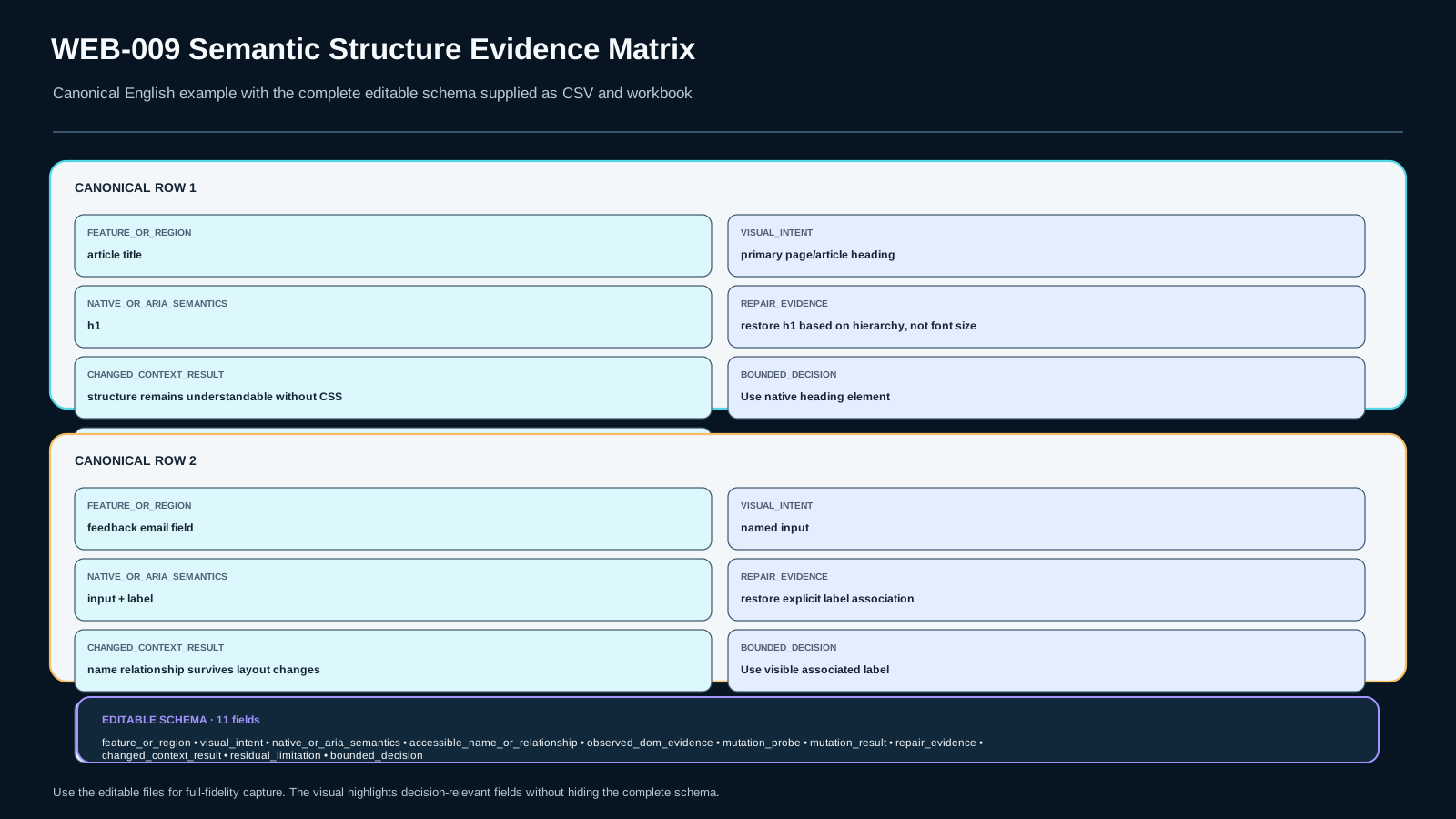
Start with a div-heavy article page: a styled top row contains topic links, the article title is a large generic container, and a feedback email field has nearby visible text but no <label> association.
A bounded repair is:
- wrap the topic links in
<nav aria-label="Article topics">; - put the primary article content in
<main>and the article itself in<article>; - make the document title a real
<h1>and subsection titles real<h2>elements according to hierarchy; - use
<form>for the feedback submission; - connect
<label for="feedback-email">Email</label>to<input id="feedback-email">; - keep the submit action as a native
<button>.
Then inspect the DOM without relying on the CSS. The structure should still be understandable when the style sheet is removed.
Mutation probes reveal false confidence
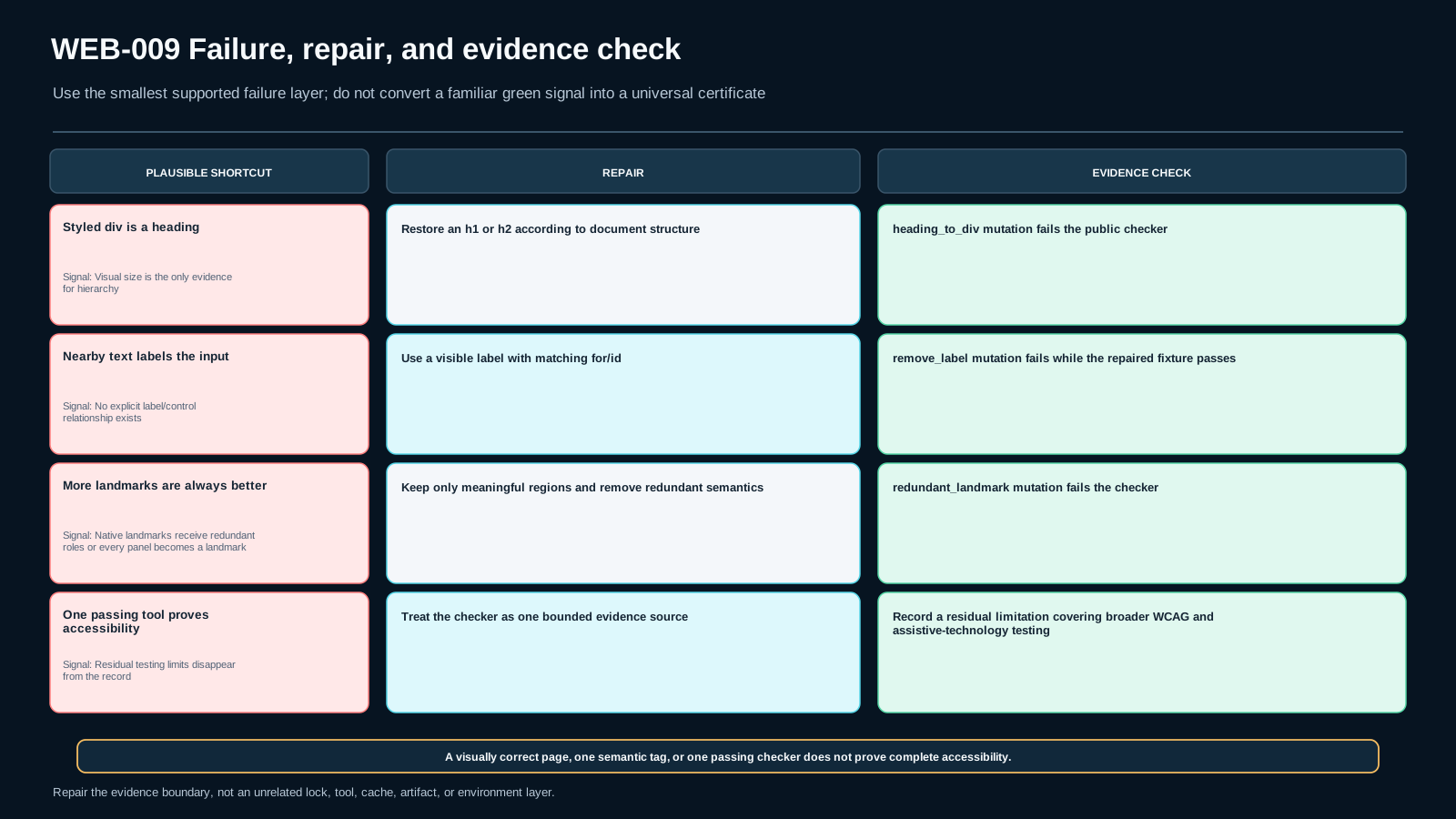
Mutation A — heading replaced with a styled generic container. The visual result can remain nearly identical while the document hierarchy loses a programmatic heading.
Mutation B — form label relationship removed. The text can remain next to the field, but the input may lose the intended accessible name relationship.
Mutation C — redundant landmark semantics added everywhere. Adding roles to elements that already carry the same native role, or turning every visual panel into a landmark, can create unnecessary or ambiguous structure.
The lab treats these as deliberate failures. A useful checker must detect the broken structure, and the repair must restore evidence without redesigning unrelated CSS or JavaScript.
For experienced programmers: inspect rendered DOM, not component names
A component called Heading, NavBar, or Field does not prove the rendered HTML has the corresponding semantics. Design-system wrappers can accidentally render generic containers. SSR can produce visually perfect markup that still has weak labels or hierarchy. Framework abstractions therefore need an output contract at the DOM boundary.
For review, inspect the rendered element, its implicit/explicit role, accessible name, relationships, heading level, and repeated landmark labels. Component source is useful evidence, but the user-facing DOM is the contract assistive technology receives.
Native element, ARIA retrofit, or generic container?
Choose a native element when it accurately represents the content or interaction. Use ARIA when a required semantic or interaction pattern cannot be represented adequately with the available native element, and then implement the complete behavior contract that pattern requires. Keep a generic container when no semantic relationship exists.
Do not use semantic tags simply to satisfy a lint count. A <section> without a meaningful structural purpose is not automatically better than a <div>. A heading level should follow hierarchy, not a desire for a particular font size. Semantics are a model of meaning.
Executable lab: repair a div-heavy fixture
Run WEB009-LAB1. The starter is intentionally visually acceptable and structurally weak. Your job is to repair the article + navigation + form structure without changing the visual contract more than necessary.
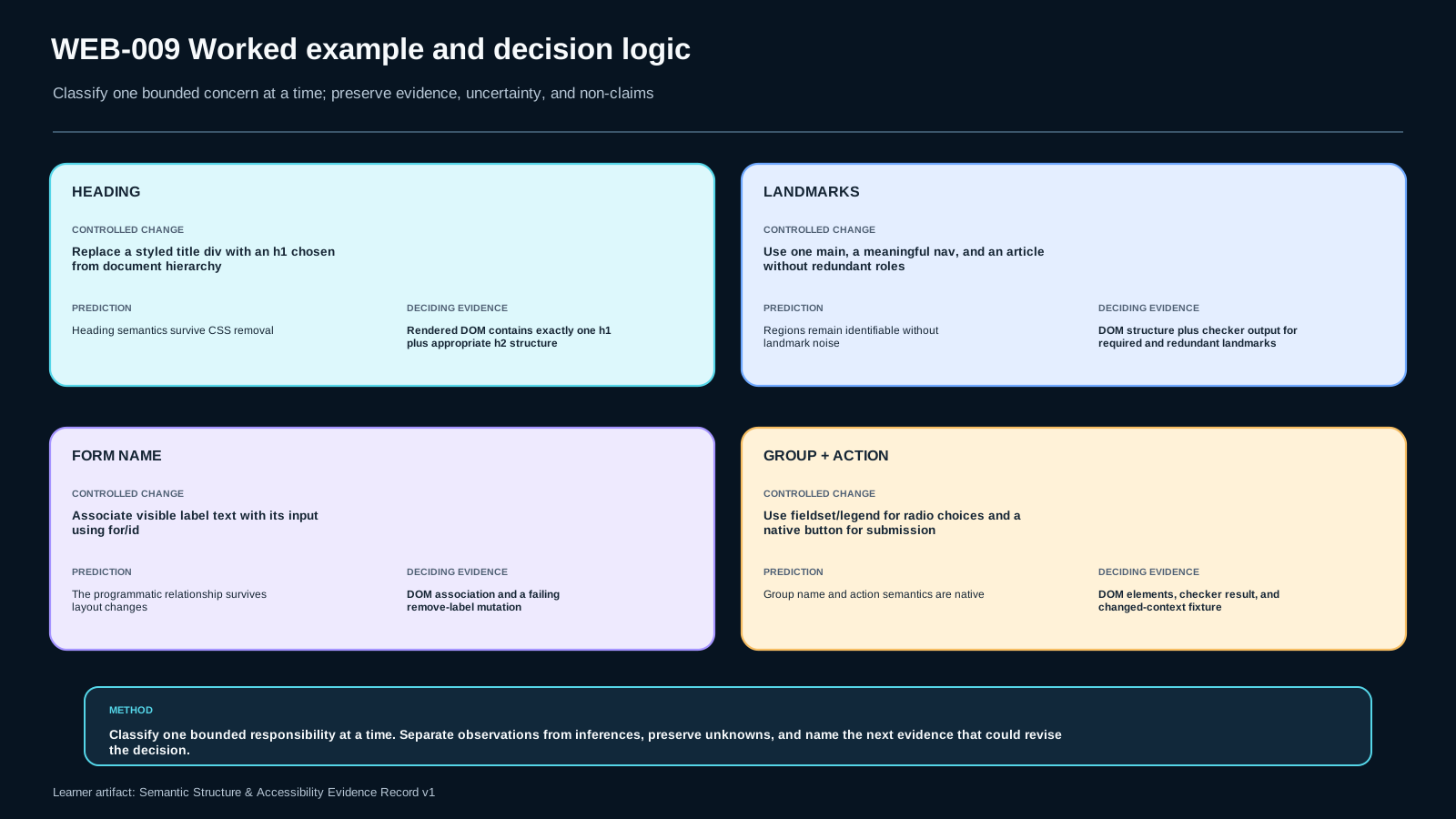
The learner-visible checker verifies the public requirements: primary/main structure, heading hierarchy, a meaningful navigation region, explicit form labels, a grouped choice relationship, and native action controls. Then run deliberate mutations and show that at least one broken heading/label/landmark condition is detected. Finally apply the same reasoning to the changed-context fixture rather than copying tags mechanically.
Record implementation evidence, observed DOM behavior, mutation result, repair result, transfer result, and one residual limitation in Semantic Structure & Accessibility Evidence Record v1.
Evidence must survive style changes
A passing screenshot is not evidence for programmatic structure. Use multiple evidence dimensions:
- implementation artifact: the actual HTML you produced;
- observable DOM/browser behavior: elements, roles, labels, relationships, and hierarchy;
- failure mutation: a deliberately broken version that the checker detects;
- repair result: the corrected version passes the bounded checks;
- changed-context transfer: a different page structure still satisfies the same semantic principles;
- residual limitation: state what this lab does not prove, such as complete WCAG conformance or behavior across every assistive-technology/browser combination.
A single automated tool is not enough to declare full accessibility. It is one evidence source inside a broader review.
Independent transfer: repair a checkout without relying on its styling
The transfer case returns to a visually polished checkout built mostly from generic containers, visible-text-only field identification, and heading styles disconnected from document structure. Produce the evidence record for the repaired structure. Justify native elements, names/group relationships, and landmark boundaries. Include one deliberate mutation and its detected evidence, then state at least one accessibility claim you still cannot make from this exercise alone.
Standards and guidance boundary
WCAG 2.2 SC 1.3.1 provides the normative outcome for programmatically determinable information, structure, and relationships. WAI's Understanding guidance explains the intent and common structural examples. ARIA APG supplies current practice guidance for landmarks and accessible names, including preference for native HTML naming techniques where possible. These sources do not support the claim that semantic HTML alone guarantees WCAG conformance, that more landmarks/headings are always better, or that ARIA should replace correct native HTML.
Assessment
There is no answer key in this lesson pack; answer it yourself and mark honestly. "Needs review" sends the lesson to your review queue.
WEB-009-S1 retrieval
State the bounded contract for semantic HTML and programmatically determinable structure. Give one non-goal about WCAG, landmarks, or ARIA.
WEB-009-S2 application
Implement the article/navigation/form lab feature and record DOM/relationship evidence for headings, landmarks, labels, grouped controls, and the native submit action.
WEB-009-S3 diagnosis
A mutation replaces a real heading with a styled generic container and removes one label association while the page still looks nearly identical. Diagnose what evidence fails and repair only the semantic/accessibility structure.
WEB-009-S4 decision
For a bounded form action, choose between correct native HTML semantics and an ARIA-heavy generic-container retrofit. Defend the choice with accessible-name/relationship evidence and state when ARIA would still be justified.
WEB-009-S5 transfer
A checkout page is visually polished but uses generic containers, visible-text-only form identification, and heading styles disconnected from document structure. Repair only the semantic/accessibility structure and prove the relationships in Semantic Structure & Accessibility Evidence Record v1.
Assessment rubric
A satisfactory submission preserves the lesson boundary, uses inspectable evidence, distinguishes observation from inference, states uncertainty/non-claims, and completes the changed-context transfer independently.
For application, diagnosis, decision, and transfer items, a brand/tool name or visual result alone is insufficient. Evidence must address the fields required by the lesson artifact.
Decision scenario
Where evidence is incomplete, UNKNOWN or a conditional decision is preferable to unsupported certainty.
References & freshness
Case studies
Lab files
Goal: repair the starter without redesigning its visual concept. Use native HTML semantics where they fit, preserve heading/landmark/form relationships, and prove structure independently of CSS.
- Copy
starter/index.htmlintoworkspace/index.html. - Repair navigation, main/article structure, heading hierarchy, form labels/groups and submit action.
- Run
python run_checks.py workspace/index.html. - Run
python mutation_probe.py workspace/index.html heading_to_div, then check the generated file and observe the failure. Repeat withremove_labelandredundant_landmark. - Repair the changed-context
transfer/starter.htmlindependently. - Fill
evidence/Semantic_Structure_Accessibility_Evidence_Record_v1.template.json.
This lab is fully local: no external network access is required.
A visually similar result is not sufficient evidence. Do not add ARIA when correct native semantics already express the same role without a documented need.
Lesson media & slides
Teaching files (download)