بازگشت به مهندسی مدرن و کار با هوش مصنوعی · فصل ۵ — Shell، Workspace، Lockfile و Build Closure · 22
Monorepo and workspace architecture
Map workspace membership, package boundaries, dependency edges, and configuration ownership before selecting monorepo tooling. میتواند «Monorepo و Workspace Architecture» را در یک workspace محدود طوری پیکربندی کند که dependency/toolchain state قابل تکرار و قابل بررسی باشد.
Lesson summary
Map workspace membership, package boundaries, dependency edges, and configuration ownership before selecting monorepo tooling.
میتواند «Monorepo و Workspace Architecture» را در یک workspace محدود طوری پیکربندی کند که dependency/toolchain state قابل تکرار و قابل بررسی باشد.
This lesson produces
میتواند «Monorepo و Workspace Architecture» را در یک workspace محدود طوری پیکربندی کند که dependency/toolchain state قابل تکرار و قابل بررسی باشد.
Who it is for
Foundation
Explicit boundary map, worked baseline, evidence prompts, and a safe local fixture.
Repair
Diagnose one misconception, reduce the fixture, rerun the relevant probe, then restore the full case.
Experienced
Skip command walkthroughs; require artifact, mutation evidence, tradeoff judgment, and residual-risk statement.
Prerequisites
When the folder tree lies about the architecture
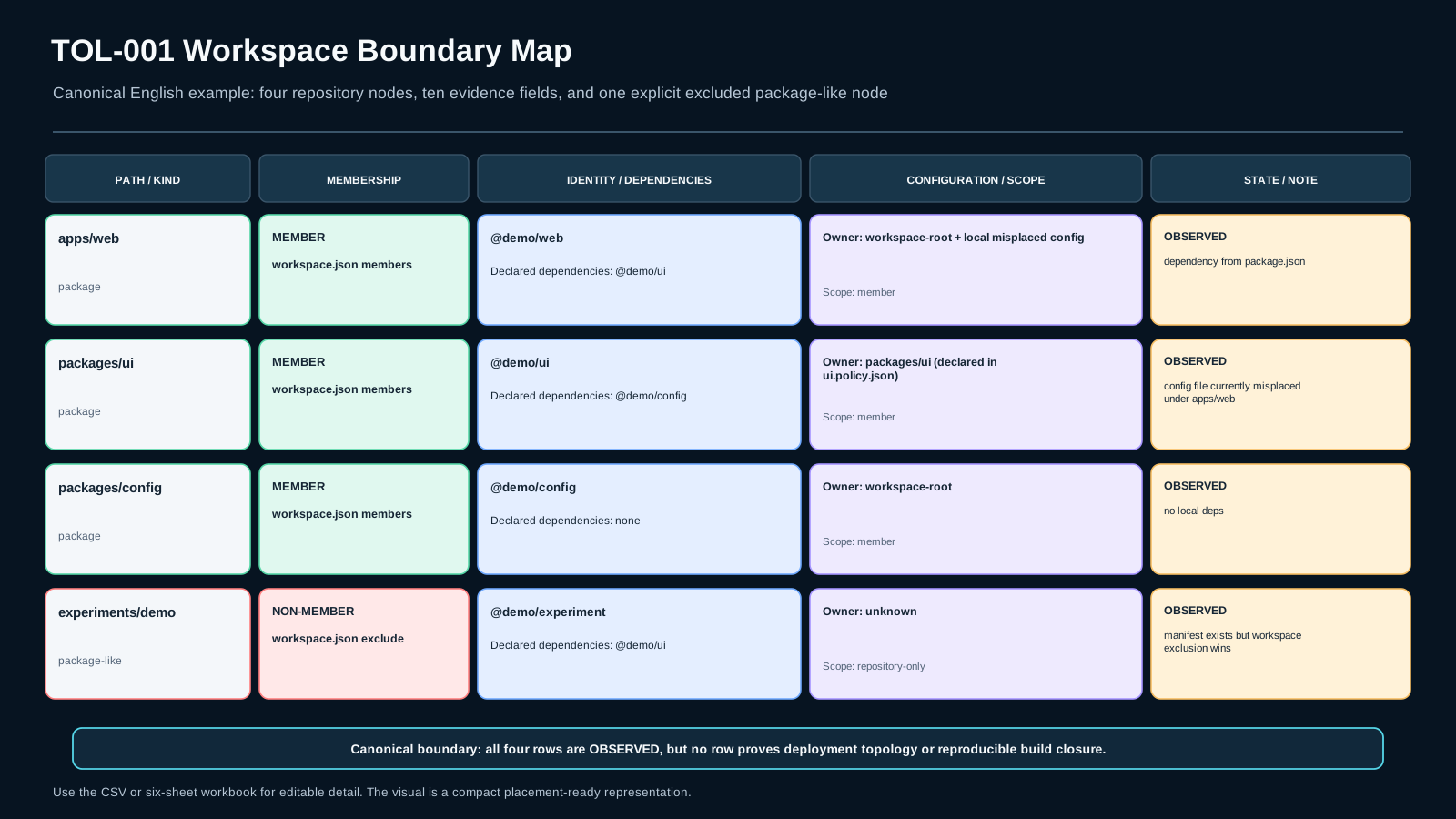
You open a repository and see apps/web, packages/ui, packages/config, and experiments/demo. All four look package-like, and experiments/demo even has a valid manifest. A folder-only reading suggests that all four belong to one workspace. The actual workspace declaration selects only the first three and explicitly leaves experiments/demo out. A configuration file is also placed at a level that conflicts with its declared owner.
This lesson is not a tool popularity contest and does not argue that monorepos are inherently better. Your deliverable is Workspace Boundary Map v1: an auditable map that separates repository containment, explicit workspace membership, package identity and declared dependency edges, and configuration ownership/scope. Every material conclusion must resolve to evidence; anything not supported stays UNKNOWN.
The central rule is: spatial proximity is not architectural membership. A folder or manifest can prove that a repository node exists, but membership, dependency, and configuration ownership each need their own authority.
Three routes, one evidence bar
On the Foundation route, make the vocabulary explicit: repository, workspace member, package identity, declared dependency, and configuration owner. Then build a guided baseline map from declarations. On the Repair route, isolate the broken misconception. If membership is correct but dependency edges are being inferred from nearby folders, repair only the manifest-to-edge reasoning.
On the Experienced / Fast Path, command walkthroughs shrink, but the artifact, mutations, oracle, and residual uncertainty remain. Familiarity with pnpm, Cargo, or any other workspace implementation is not permission to treat the directory tree as authority.
Before executing anything, write down the claim you want to prove, the authoritative source for that claim, and one independent observation that could falsify your current explanation.
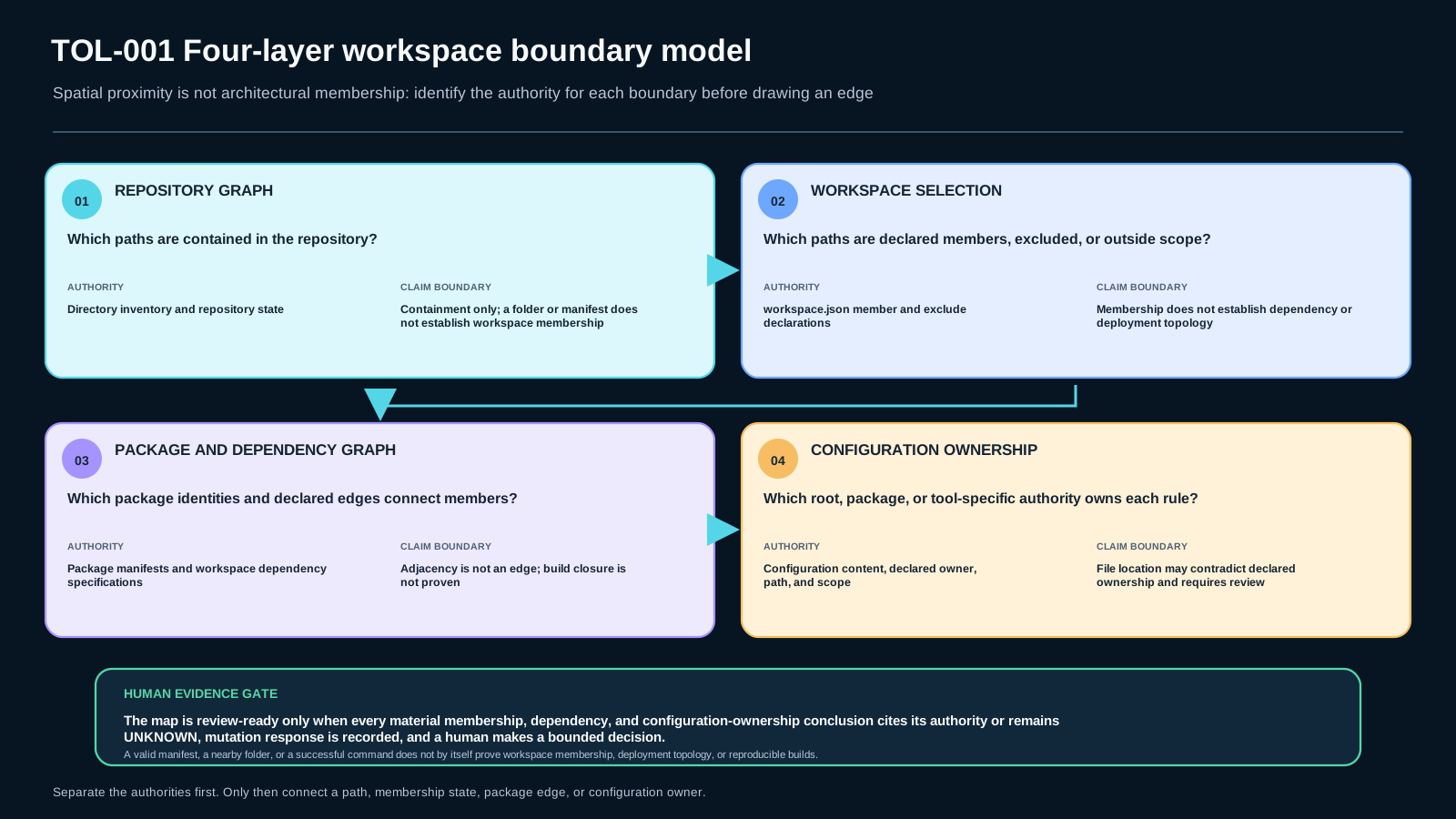
Mental model: do not collapse four graphs into one
Keep four layers separate:
- Repository graph: paths contained inside the versioned repository boundary. This layer expresses containment only.
- Workspace selection: packages selected into a coordination boundary and paths explicitly excluded or outside its scope.
- Package/dependency graph: package identity and declared dependency edges come from manifests, not directory adjacency. Neighboring packages may have no direct dependency.
- Configuration ownership graph: configuration may be root-scoped, package-local, or tool-specific. A root file does not prove universal inheritance; the relevant configuration/tool contract defines scope.
These layers can overlap, but they are not equivalent. Workspace membership does not prove deployment topology and does not guarantee a reproducible build. This lesson builds the architecture map only; lockfiles, caches, and closure belong to later lessons.
Build Workspace Boundary Map v1 from declarations
For each node, record at least: repo_path, node_kind, declared_member, membership_evidence, package_identity, declared_dependencies, config_owner, scope, evidence_state, and notes.
Use evidence labels precisely:
OBSERVED: directly visible in a file or fixture output;INFERRED: derived from observations but not itself a direct declaration;UNKNOWN: required evidence is unavailable or a contradiction remains unresolved.
Order matters. Inventory the repository tree first, then read the workspace declaration, parse package manifests separately, and finally record configuration ownership. If you start from the tree and simultaneously guess membership, observation and inference become entangled.
Why “same repo” and “same workspace” are different claims
Current pnpm documentation defines a pnpm workspace through root workspace configuration and documents the workspace: protocol as a way to constrain resolution to local workspace packages. That is one concrete implementation, not a universal workspace format. Cargo provides a second implementation: a workspace is a collection of member packages; members and exclude shape membership, while selected state such as Cargo.lock and the output directory is shared at workspace level.
Start with the construct, not the brand. Ask: “what is authoritative for membership?” Then ask: “which manifest declares this package identity and this dependency edge?” Finally ask: “which configuration is authoritative for this scope?”
A package.json or Cargo.toml in a directory proves that the directory is package-like. It does not, by itself, prove workspace membership. Likewise, a folder named ui beside a folder named web creates no dependency edge. The edge is defensible when a manifest or another explicit source of truth declares it.
Worked example: a valid non-member and a misplaced config
In the baseline fixture, workspace.json declares three members: apps/web, packages/ui, and packages/config. experiments/demo has a valid package.json, but it appears in exclude. Its repository presence is OBSERVED, and its package-like identity is OBSERVED, but workspace membership is false because of the declaration, not because of its folder name.
The apps/web manifest declares a local dependency on @demo/ui; packages/ui declares one on @demo/config. Those edges come from manifests. Moving directories without changing manifests does not, by itself, create new declared dependency edges.
Another configuration declares packages/ui as its owner but is placed under apps/web. Record this as a contradiction until the ownership rule is resolved. “The file exists” is not equivalent to “the ownership is correct.”
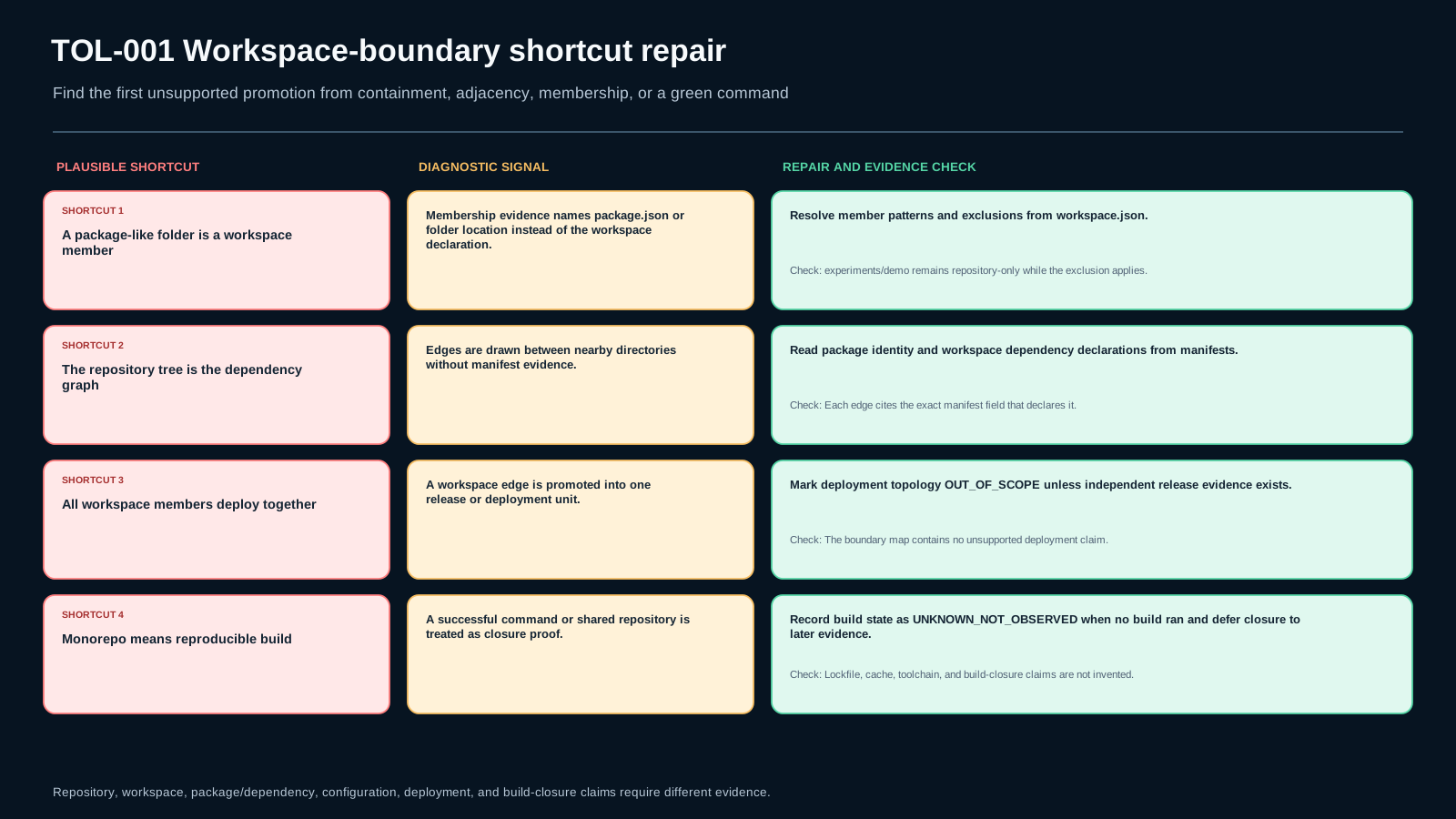
Four shortcuts that corrupt the map
“Every package-like folder is a workspace member.” Repair: derive the member set from the workspace declaration and record non-members explicitly.
“The repository tree is the dependency graph.” Repair: build dependency edges only from declarations and keep adjacency as containment.
“All workspace members are one deployment unit.” Repair: mark deployment OUT_OF_SCOPE; workspace coordination is a source/tooling boundary, not necessarily a release boundary.
“Monorepo means reproducible build.” Repair: deliver the Workspace Boundary Map and pass lockfile/cache/build-closure questions to later toolchain lessons.
For experienced engineers: connect the map to a real repository without overclaiming
A real repository may contain multiple workspaces, generated packages, nested tooling, or complex configuration inheritance. The method remains stable: locate the authority for each claim, label nodes and edges with evidence, preserve contradictions, and do not force unknown fields into a confident answer.
If internal tooling generates a package graph, treat its output as an observation rather than absolute truth. For a material edge, trace back to a reviewable manifest or source of truth. If configuration inheritance is tool-specific, bound the claim to that tool and version.
The goal is an architecture evidence layer that later lessons can use to reason about lockfiles, task graphs, environments, and exact closure.
A monorepo is a tradeoff, not a quality badge
A monorepo can make cross-package changes, shared policy, and dependency visibility easier. It can also increase graph size, organizational coupling, configuration-scope complexity, and the blast radius of changes. None of those facts creates a universal “better” or “worse” verdict.
A multi-repo design may create clearer ownership or release boundaries while making coordination and cross-repository changes more expensive. Architecture selection is outside this lesson. Your task here is to map the topology that exists without selling a style.
Lab: baseline first, mutation second
Create the fixture with setup_fixture.py. It requires no network, credentials, or privileges. inspect_repository.py reports raw evidence from the workspace declaration, manifests, and configuration files; it does not decide the final architecture for you. Record its bounded runtime/fixture identity and keep build state UNKNOWN_NOT_OBSERVED when no build or install was run.
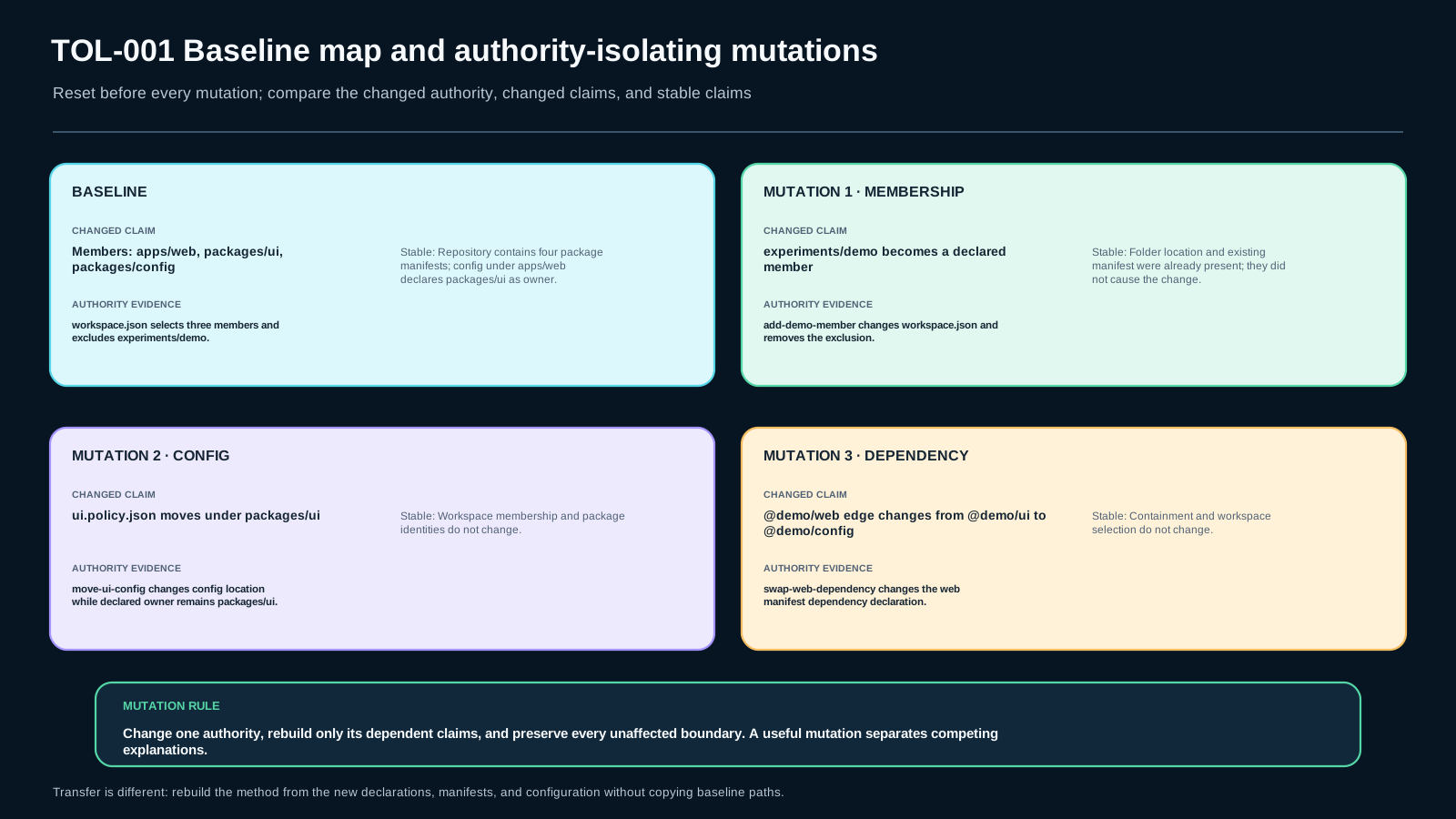
For the baseline, complete Workspace Boundary Map v1 and cite an evidence path for every member and non-member. Then run three mutations separately: add or remove a member, move a configuration boundary, and replace one dependency edge. After each mutation, only map fields whose authority changed should change.
The transfer fixture uses different paths and membership patterns. No ready-made command sequence is provided. Before each probe, state which map field you expect to change and which observation would falsify that expectation.
Minimum defensible evidence
A Workspace Boundary Map is reviewable when each node’s membership traces to a declaration, package identity and dependency edges trace to manifests, configuration ownership/scope has evidence, non-members and unknowns are preserved, and mutation response can be reproduced.
If declared state and observed output conflict, do not force a conclusion. Record the contradiction and design a smaller discriminating probe. A green command proves only what that command actually observed, not the full architecture. The final decision must be bounded: what is proven, what is inferred, and what remains unknown.
Assessment: diagnosis, decision, application, and transfer
AS1 — Diagnosis: inspect a map that labels experiments/demo as a member merely because it has a manifest. Identify the smallest failing boundary and the evidence that rejects the alternative.
AS2 — Decision: you have a repository tree and a successful command, but incomplete workspace declarations or dependency manifests. Issue ACCEPT / REJECT / DEFER and state residual risk.
AS3 — Application: inspect the baseline fixture, complete Workspace Boundary Map v1, and use at least two mutations to show that the map changes with authority rather than folder naming.
AS4 — Transfer: on the transfer fixture, reconstruct member selection, dependency edges, and configuration ownership without sequence hints, and state what remains unproven.
The critical dimensions are boundary correctness, evidence traceability, and mutation robustness. Strong prose cannot compensate for a missing critical evidence dimension.
Source and freshness boundary
Tool-specific claims are bounded to current official documentation. The pnpm documentation checked on 2026-09-08 describes root workspace configuration and the workspace: protocol. Cargo documentation checked the same day describes workspace members, members/exclude, and shared workspace state such as Cargo.lock and the output directory.
This lesson does not generalize one tool’s syntax to every ecosystem. If tool semantics change or the review date arrives, current claims must be rechecked against the relevant official source. Workspace Boundary Map v1 is a curriculum evidence artifact, not an industry-mandated standard.
Assessment
There is no answer key in this lesson pack; answer it yourself and mark honestly. "Needs review" sends the lesson to your review queue.
AS1 diagnosis
A map labels experiments/demo as a workspace member because it contains package.json. Diagnose the smallest failing boundary and name evidence that would decide membership.
AS2 decision
You have a repository tree and a green command but incomplete workspace declarations. Decide ACCEPT, REJECT, or DEFER for the full boundary map and state residual risk.
AS3 application
Complete the baseline Workspace Boundary Map and run at least two targeted mutations. Explain exactly which map fields change and why.
AS4 transfer
Reconstruct the map on the transfer fixture without sequence hints. State what is observed, inferred, and still unproven.
Assessment rubric
Critical dimensions are non-compensatory.
- Boundary correctness — critical: membership is derived from workspace authority; deployment and closure are not silently claimed.
- Evidence traceability — critical: each material conclusion points to a declaration/manifest/config observation or is
UNKNOWN. - Mutation robustness — critical: the map changes only where the mutated authority changes.
- Transfer and residual risk: the method works on the changed fixture and remaining uncertainty is explicit.
A polished explanation does not compensate for failure on a critical dimension.
References & freshness
Case studies
Lab files
- Run
python setup_fixture.py --case baseline. - Inspect
workspace/and runpython inspect_repository.py. - Copy the reported
environment_identityandobservation_boundaryintosubmission_notes.md. Do not dump environment variables or credentials. - Fill
workspace_boundary_map.csv. Do not infer membership from folder names. Cite a file/command observation for each material row; the reviewer compares your result with a hidden oracle. - Reset before each mutation, then run one mutation at a time with
mutate_fixture.py. - Record what changed, which authority changed, what stayed unknown, and one independent observation that could falsify your conclusion.
- For transfer, run
python setup_fixture.py --case transferand reconstruct the map without a supplied sequence.
If no build/install was executed, keep observed build state as UNKNOWN_NOT_OBSERVED; do not turn static architecture evidence into a reproducibility claim.
Safety boundary: local fixture only; no network, credentials, privileges, broad environment dumps, or host-destructive operations.
Lesson media & slides
Teaching files (download)