وب مدرن، رابط کاربری و تجربهی وب · فصل ۱ — مرورگر، سرور، رندر و معماری صفحه · 35
Where Motion, Scroll, 3D, and PWA Capabilities Live in the Web Stack
Understand and decide experience-capability placement without prematurely choosing an implementation stack. For a bounded experience requirement, identify the browser/CSS/JavaScript/Web API/application responsibilities involved, state compatibility/fallback needs, and avoid choosing a framework before the capability boundary is understood.
موشن، اسکرول، سهبعدی و PWA در کدام لایهی وب ساخته میشوند؟ — fa-IR
Lesson summary
Understand and decide experience-capability placement without prematurely choosing an implementation stack.
For a bounded experience requirement, identify the browser/CSS/JavaScript/Web API/application responsibilities involved, state compatibility/fallback needs, and avoid choosing a framework before the capability boundary is understood.
This lesson produces
For a bounded experience requirement, identify the browser/CSS/JavaScript/Web API/application responsibilities involved, state compatibility/fallback needs, and avoid choosing a framework before the capability boundary is understood.
Who it is for
Foundation
Use labeled diagrams, one concept per card, and explicit before/after examples.
Repair
Return to the failure counterexample and require the learner to name the collapsed boundary before continuing.
Experienced
Skip basic vocabulary and require exception handling, tradeoff language, and a changed-context decision.
Prerequisites
A feature is not owned by the framework name
A product brief says: “We need smooth motion, scroll effects, a 3D viewer, and PWA support. Which framework gives us those?” The question hides the actual engineering boundaries. Motion can be implemented with CSS or JavaScript. Scroll behavior can involve CSS features, Browser APIs, or application logic. 3D rendering can use browser graphics APIs such as WebGL or WebGPU. Installability is a web-app capability with manifest and browser requirements; a service worker is common for offline behavior but is not itself an absolute installability requirement in the current MDN guidance.
This lesson builds Experience Capability Placement Record v1. The goal is to place each capability in its actual web-platform/application boundary before deciding which framework or library, if any, should coordinate it.
Start from Browser responsibilities, then add tools
WEBF-001 supplies the Browser/resource mental model. WEBF-007 supplies role classification so that a framework is not mistaken for a browser capability. Keep those boundaries while asking: what primitive provides the capability, what application code coordinates it, what compatibility constraint exists, and what fallback preserves the user outcome?
This lesson does not teach animation choreography, GPU programming, service-worker caching strategy, or framework-specific PWA plugins. It owns capability placement and compatibility/fallback reasoning.
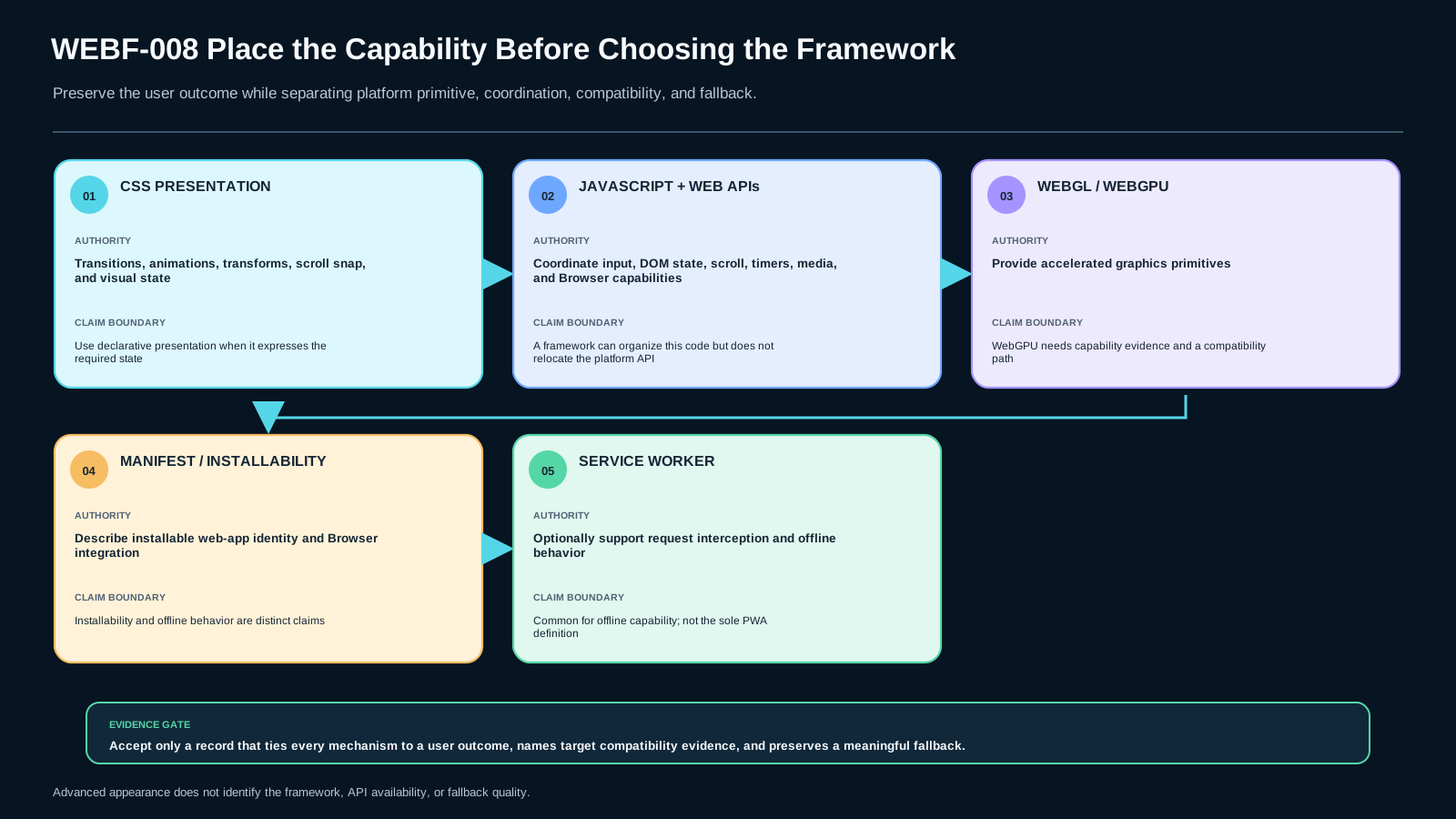
Use four capability layers
Presentation layer — CSS. CSS describes document presentation and includes modules for transitions, animations, transforms, scroll snap, scroll-driven animations, overflow, and other rendering behavior. [S-MDN-CSS]
Browser behavior layer — JavaScript + Web APIs. Application code can respond to user input, scroll state, DOM changes, timers, media, and other browser-exposed capabilities. A framework can organize this code, but the Browser API remains the platform boundary.
Graphics layer — WebGL / WebGPU. WebGL is a JavaScript API for accelerated interactive 2D/3D graphics in a compatible browser. WebGPU is a newer graphics/compute API with important capability advantages, but MDN currently marks it as Limited availability; it must not be treated as universally available. [S-MDN-WEBGL] [S-MDN-WEBGPU]
Installable web-app layer — manifest plus browser criteria. Current MDN guidance treats a web app manifest as central to installability. It also explicitly notes that a service worker is not a requirement for a PWA to be installable, although many PWAs use one for offline experiences. [S-MDN-PWA]
Record capability placement per outcome, not per buzzword
For each experience capability, record:
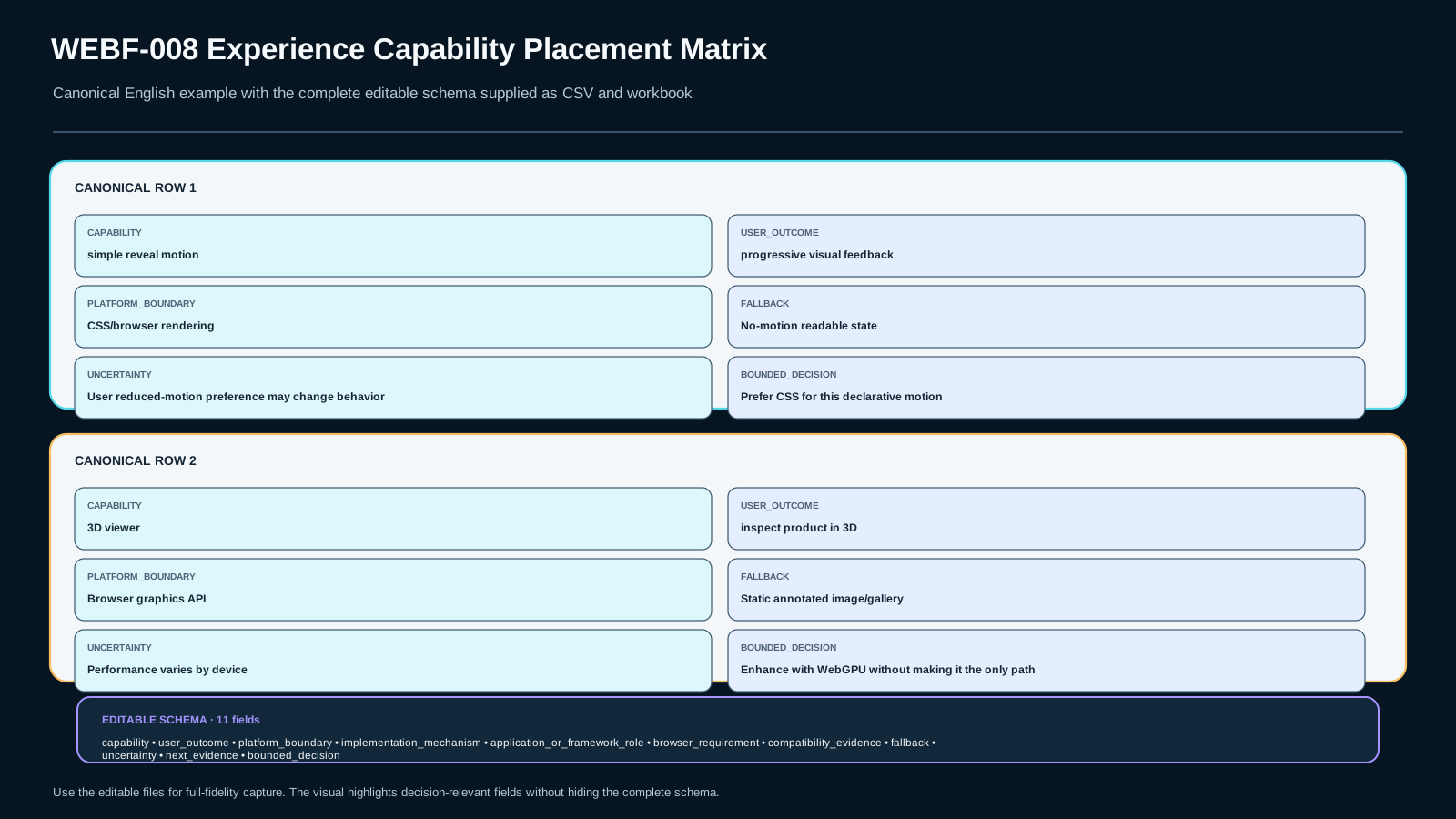
user_outcome— what the user should actually experience;platform_boundary— CSS, DOM/Web API, graphics API, installability/browser integration, server/data, or multiple;implementation_mechanism— the concrete mechanism under consideration;application_or_framework_role— orchestration, state, component integration, routing, or none;browser_requirement— feature/secure-context/device support that matters;compatibility_evidence— what is known about availability;fallback— a meaningful alternative when the preferred capability is unavailable;uncertaintyandnext_evidence;bounded_decision.
These fields form Experience Capability Placement Record v1. Do not write “framework handles 3D” when the actual primitive is WebGL/WebGPU and the framework merely hosts or coordinates the canvas/component.
Separate the user outcome from the mechanism
A user outcome such as “the product model can be inspected from several angles” can have several mechanisms. WebGPU may be preferred for a particular renderer, WebGL may be a compatibility path, and a static image gallery may be the fallback for devices that cannot run the 3D path acceptably. The outcome survives even when the mechanism changes.
The same reasoning applies to motion. A simple state transition may belong entirely in CSS. A motion sequence tied to complex application state may require JavaScript coordination. A framework may provide lifecycle or state abstractions, but it does not move CSS animations or WebGL into a new browser layer.
PWA reasoning needs the same discipline. “Installable,” “offline-capable,” “background behavior,” and “cached” are different claims. A service worker can support offline behavior and request interception, but current installability guidance does not make it the sole definition of a PWA. Treat each capability as a separate row.
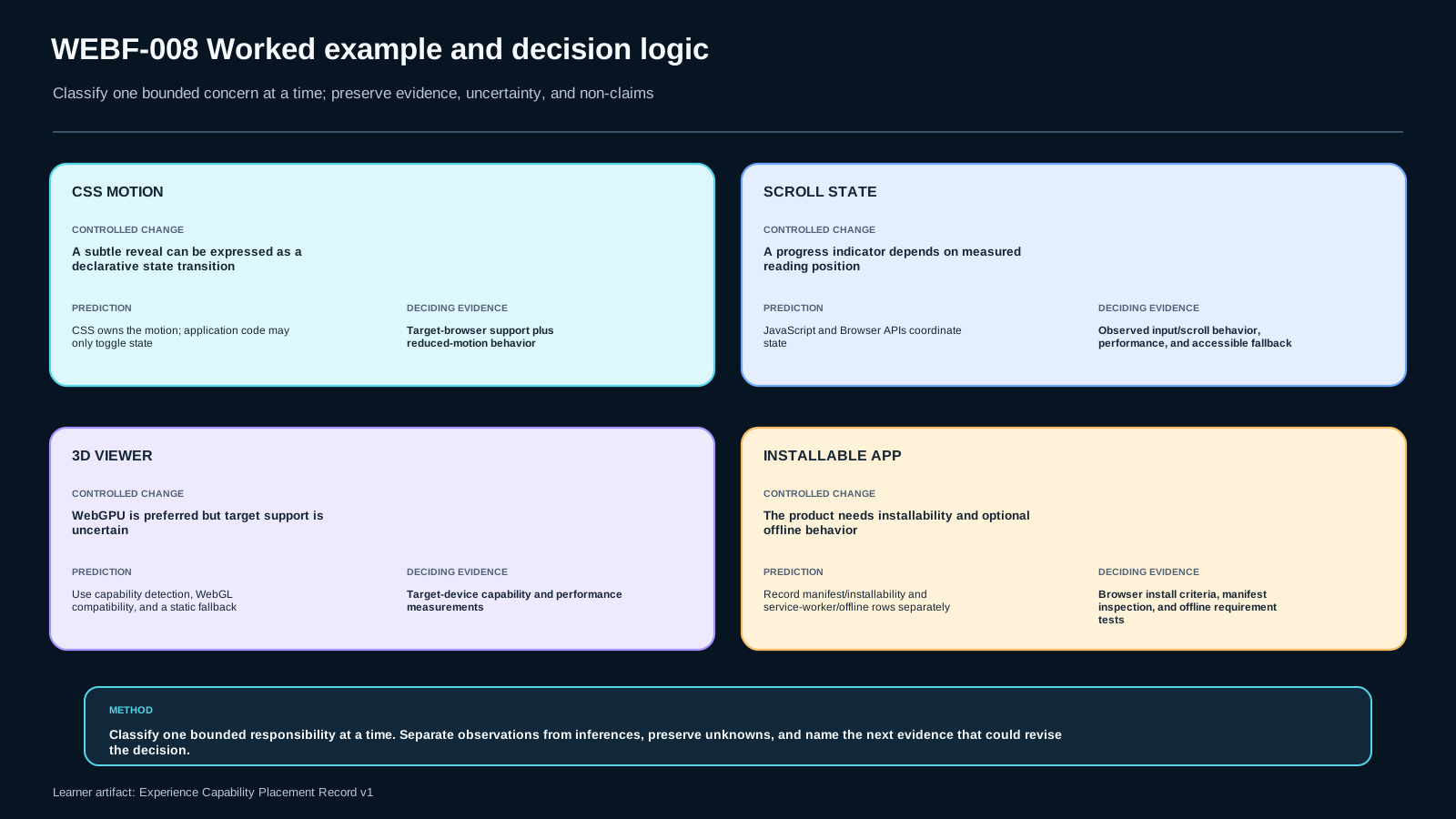
Worked example: interactive article without a framework assumption
An article page needs a subtle reveal as figures enter the reading flow and a simple 3D molecular diagram.
A bounded placement could be:
- reveal motion: start with CSS animation/transition if the state can be expressed declaratively; JavaScript may only add/remove state classes;
- 3D diagram: WebGL in a canvas for the graphics primitive; application code manages the data and user controls;
- fallback: an annotated static image if graphics initialization fails or the device cannot provide a usable context.
The record does not need a framework name to be correct. If a framework later hosts the page, add its coordination role without rewriting the platform boundary.
Common boundary mistakes
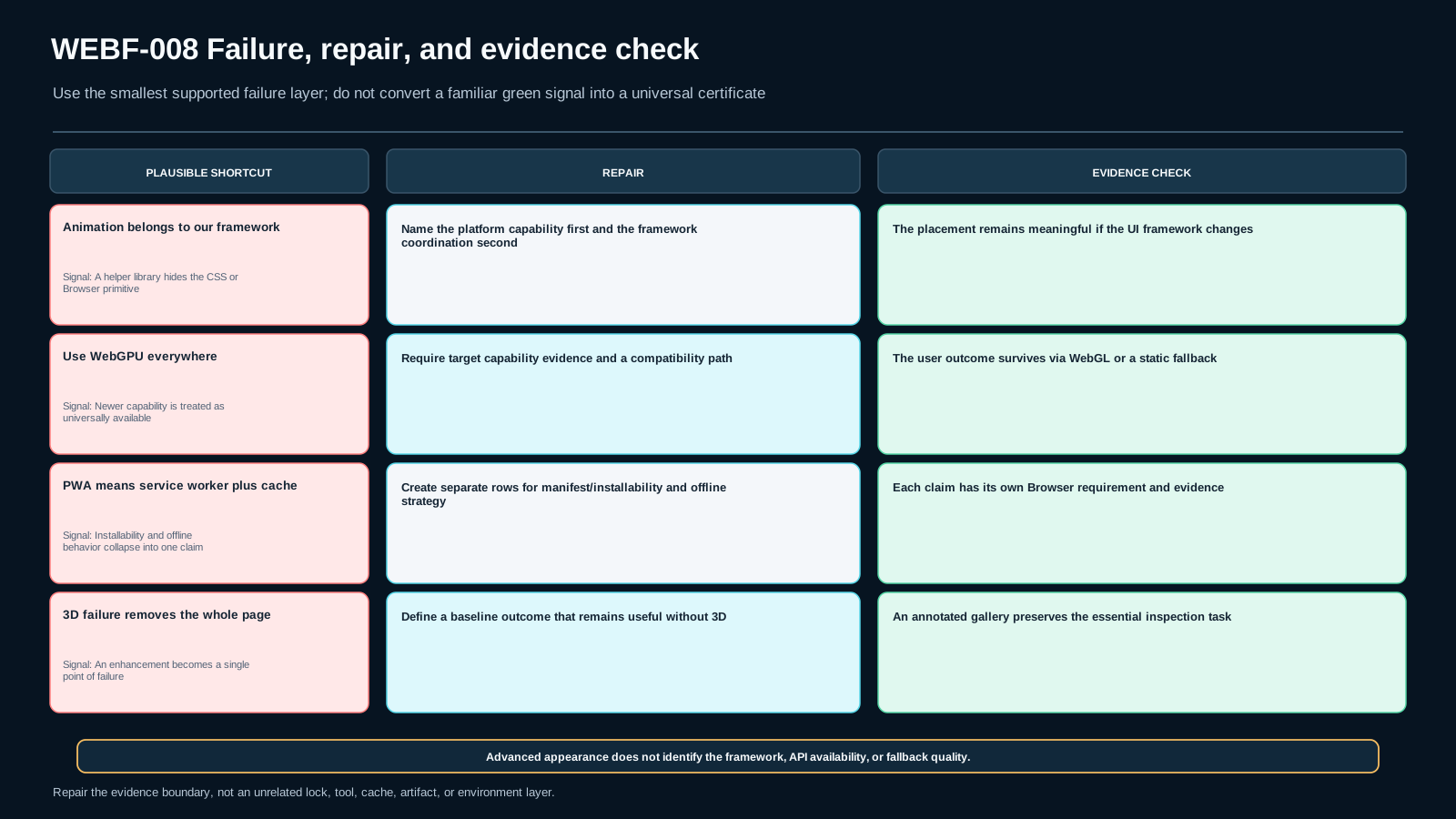
“Our framework supports animation, so animation belongs to the framework.” The framework may expose helpers, but CSS and Browser APIs remain independent platform capabilities.
“Use WebGPU everywhere because it is newer.” Current compatibility evidence does not justify universal availability. A fallback or capability check is part of the decision. [S-MDN-WEBGPU]
“PWA means service worker plus offline cache.” That collapses several capabilities and is too strong for current installability guidance. [S-MDN-PWA]
“If the 3D viewer fails, remove the whole product page.” A resilient design preserves the core user outcome with a bounded fallback rather than making one enhancement a single point of failure.
For experienced programmers: classify enhancement as a contract
Treat advanced experience features as progressive capability contracts. The baseline contract should remain useful without the enhancement. The enhanced contract adds capability under explicit conditions. This makes dependency boundaries testable: Browser feature detection, secure-context requirements, device capability, input mode, reduced-motion preference, or asset availability can each change the path without changing the product's whole architecture.
Also avoid “framework portability” claims without evidence. A WebGL renderer may be wrapped in several component systems, but integration lifecycle, cleanup, event handling, and SSR constraints still need framework-specific work.
Choose mechanisms by constraints, not status
CSS motion is often simpler and keeps work near presentation when the state is declarative. JavaScript coordination is appropriate when motion follows application state or measurements that CSS alone cannot express cleanly. WebGL has broad modern-browser support, while WebGPU offers newer capabilities but currently needs compatibility planning. Static or video representations can be legitimate fallbacks when interactive 3D is not essential.
For PWA capabilities, separate installability, offline strategy, update strategy, notifications, and background behavior. Adding every capability can increase complexity and permission surface. Choose only those tied to a user requirement.
Place capabilities before naming a library
Guided: A dashboard has a CSS hover transition, a scroll position indicator updated by JavaScript, and a canvas chart. Fill three rows: platform boundary, application role, compatibility evidence, and fallback.
Independent: A marketing site asks for “cinematic scroll, immersive 3D, and app-like behavior.” Rewrite each phrase as a measurable user outcome. Then create rows without choosing a framework. Mark where compatibility or device evidence is missing.
Evidence bar for the placement record
A reviewer should be able to see that:
- each capability has a user outcome separate from its implementation mechanism;
- CSS, Browser API, graphics API, framework/application code, and installability boundaries are not collapsed;
- WebGPU is not described as universally available;
- service worker presence is not used as the definition of installability;
- fallback preserves the essential outcome rather than merely suppressing an error;
- unknown compatibility or device constraints remain explicit;
- no row claims that 3D requires a particular UI framework.
Transfer to a product page
The final transfer is a product page with CSS motion, a 3D viewer that can use WebGL as a fallback for a WebGPU-enhanced path, and installability requirements. Build the placement record without coupling the architecture to one UI framework. Separate installability from offline behavior, state the compatibility evidence you would check, and preserve a useful non-3D fallback.
Source boundary and review date
CSS, WebGL, WebGPU, and PWA/installability claims are grounded only in the declared current MDN pages. Compatibility is time-sensitive: especially WebGPU support and installability criteria. Recheck those sources at the review date or when browser support changes materially. No source in this lesson authorizes “one framework owns motion/3D/PWA” or a universal best-stack conclusion.
Assessment
There is no answer key in this lesson pack; answer it yourself and mark honestly. "Needs review" sends the lesson to your review queue.
WEBF-008-SUM1 retrieval
Place CSS motion, scroll behavior, WebGL/WebGPU 3D, and PWA installability into their relevant web-platform/application boundaries. State one explicit non-claim.
WEBF-008-SUM2 application
An article uses a CSS transition, JavaScript scroll state, and a WebGL canvas viewer. Create separate capability rows with mechanism, browser requirement, application role, and fallback.
WEBF-008-SUM3 diagnosis
A team ships a WebGPU-only 3D configurator and calls compatibility solved because it works on one test machine. Diagnose the evidence failure and design a bounded fallback path.
WEBF-008-SUM4 decision
A web app needs to be installable. Decide what installability evidence you must verify without assuming that a service worker or offline cache is the definition of installability.
WEBF-008-SUM5 transfer
A product page uses CSS motion, a WebGL fallback for a WebGPU-enhanced 3D viewer, and installability requirements without coupling the solution to one UI framework. Complete Experience Capability Placement Record v1.
Assessment rubric
A satisfactory submission preserves the lesson boundary, uses inspectable evidence, distinguishes observation from inference, states uncertainty/non-claims, and completes the changed-context transfer independently.
For application, diagnosis, decision, and transfer items, a brand/tool name or visual result alone is insufficient. Evidence must address the fields required by the lesson artifact.
Decision scenario
Where evidence is incomplete, UNKNOWN or a conditional decision is preferable to unsupported certainty.
References & freshness
Case studies
Lesson media & slides
Teaching files (download)